
Reference
ESP32-S3-DevKitC-1 Pinout (N8R2 and N16R8)
The real pin reference for the ESP32-S3-DevKitC-1 with 44 pins and two USB ports: what N8R2 and N16R8 mean, which pins you can't use, the strapping pins and how to program it.
- ESP32
- 7 min read
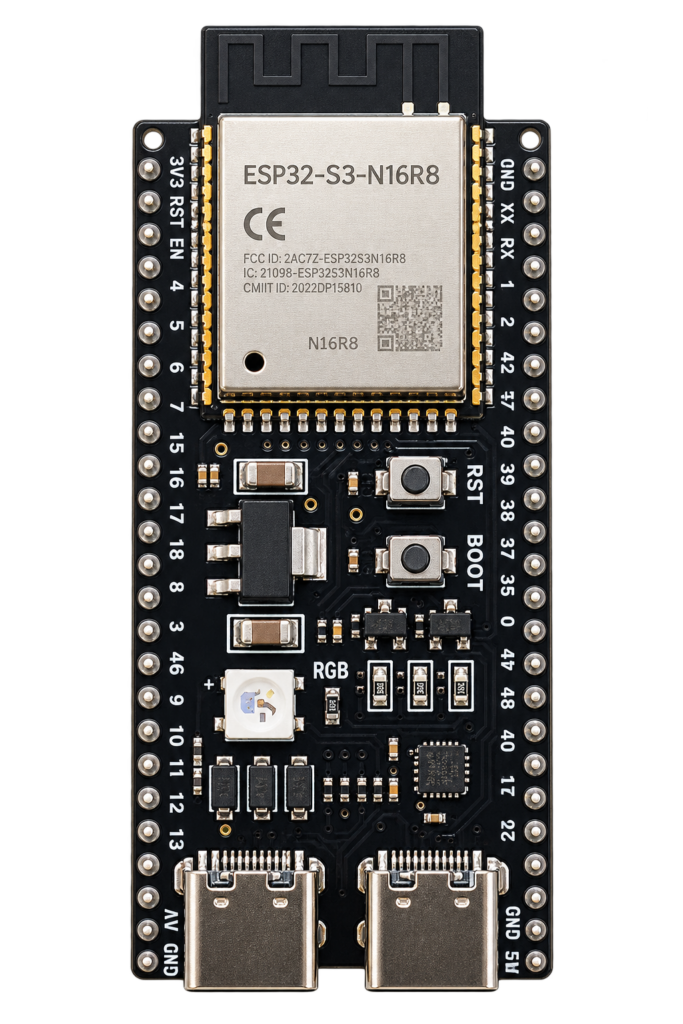
The ESP32-S3-DevKitC-1 is Espressif’s own development board for the ESP32-S3: two headers of 22 pins (44 pins in total), two USB ports, a BOOT and a RESET button and an addressable RGB LED. The boards sold as “ESP32-S3 DevKitC-1 N8R2 / N16R8, WiFi BT, 44 pin, Type-C” follow this layout. This guide covers the real pinout, the difference between the N8R2 and the N16R8, and the pins you should leave alone.
The pin data comes from Espressif’s own user guide for the DevKitC-1 v1.1. Cheap boards from other sellers can differ in small details, so check your own board’s silkscreen against the table.
System-on-chip and board
The ESP32-S3 is Espressif’s dual-core Xtensa LX7 chip (up to 240 MHz) with Wi-Fi 4 (802.11 b/g/n, 2.4 GHz only), Bluetooth 5 LE and a full-speed USB OTG interface. “BT” in the listings means Bluetooth Low Energy: the chip has no Classic Bluetooth.
The board carries an ESP32-S3-WROOM-1 module (flash, PSRAM, crystal and PCB antenna in one shielded package), a 5 V to 3.3 V regulator, a USB-to-UART bridge, the BOOT and RESET buttons, a power LED and the RGB LED. Versions with a “U” (WROOM-1U) have a connector for an external antenna instead of the PCB antenna.
Two USB ports
| Port | Connected to | Use it for |
|---|---|---|
| UART | The on-board USB-to-UART bridge, GPIO43 and GPIO44 | Power, flashing and the serial monitor. Use this one first |
| USB | The chip’s own USB, GPIO19 and GPIO20 | Power, native USB (keyboard, mass storage, serial) and JTAG debugging |
Espressif lists three power options that are mutually exclusive: one or both USB ports, the 5V and G pins, or the 3V3 and G pins. Don’t connect more than one source at the same time.
Board overview
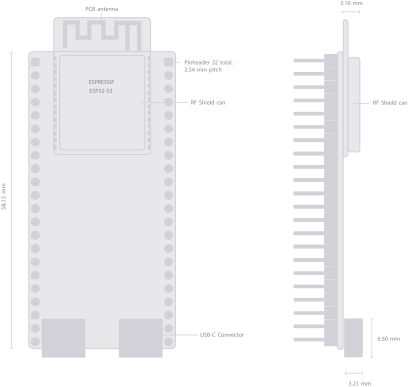
The module with its PCB antenna sits at the top, the two USB-C connectors at the bottom, and a row of pin headers runs down each long side. The ESP32-S3 chip is under the RF shield can.
N8R2 or N16R8: what the letters mean
N is the flash size in MB and R is the PSRAM size in MB. PSRAM is extra RAM you need for big buffers: camera frames, displays, audio or large JSON.
| Version | Flash | PSRAM | GPIO35 to 37 | Notes |
|---|---|---|---|---|
| N8R2 | 8 MB | 2 MB, quad | Free to use | Espressif has marked the N8R2 as end of life, you still find it in shops |
| N8R8 | 8 MB | 8 MB, octal | Not usable | Sold by Espressif itself |
| N16R8 | 16 MB | 8 MB, octal | Not usable | The module exists, but I did not find this version in Espressif’s own board list, so these boards come from other sellers |
The rule from Espressif: on boards with an octal flash or PSRAM module, GPIO35, GPIO36 and GPIO37 are used for the internal link to that memory and are not available for your own circuits. The quad PSRAM of the N8R2 doesn’t use them.
Which one to buy? If you don’t need much RAM, the N8R2 is plenty and keeps three more pins free. For cameras, screens, audio or a lot of data, take the N16R8: 16 MB of flash for the program and files and 8 MB of PSRAM.
Disclosure: this is the N16R8 board I use for my Pit Droid controller: ESP32-S3-DevKitC-1 N16R8*. It is an affiliate link, if you buy through it I may earn a small commission at no extra cost to you.
Pinout diagram
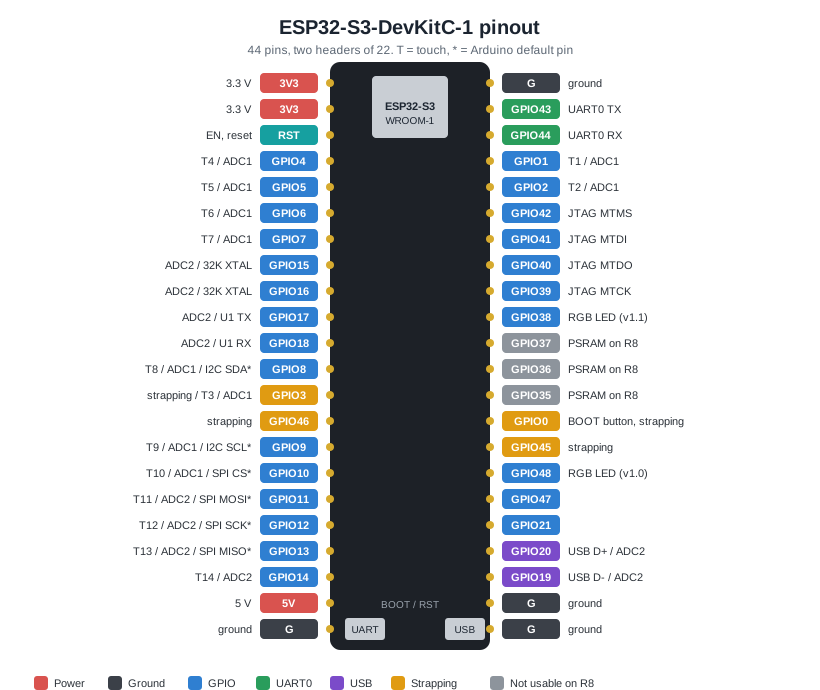
Left is header J1 and right is header J3, with the USB end at the bottom. T is a touch-capable pin and the star marks the default pin of the Arduino core. Grey pins are not usable on boards with octal PSRAM.
GPIO reference
All 36 pins of the headers that carry a GPIO, in order of number. ADC1 and ADC2 are the two analog converters (see the gotchas for ADC2).
| GPIO | Function | ADC | Touch | Notes |
|---|---|---|---|---|
| 0 | BOOT button, strapping | No | No | Low at reset starts download mode. Safe as an input after boot |
| 1, 2 | GPIO | ADC1 | T1, T2 | |
| 3 | Strapping (JTAG source) | ADC1 | T3 | Leave it alone unless you need to |
| 4 to 7 | GPIO | ADC1 | T4 to T7 | Good general-purpose analog pins |
| 8 | I²C SDA (Arduino default) | ADC1 | T8 | Remappable with Wire.begin(SDA, SCL) |
| 9 | I²C SCL (Arduino default) | ADC1 | T9 | Remappable |
| 10 to 13 | SPI CS, MOSI, SCK, MISO (Arduino default) | ADC1 (10), ADC2 (11 to 13) | T10 to T13 | Default FSPI pins |
| 14 | GPIO | ADC2 | T14 | |
| 15, 16 | GPIO, 32 kHz crystal pins | ADC2 | No | Free if you don’t add a 32 kHz crystal |
| 17, 18 | UART1 TX, RX (default) | ADC2 | No | |
| 19, 20 | USB D- (19) and USB D+ (20) | ADC2 | No | Native USB. Don’t use as plain GPIO if you use USB |
| 21 | GPIO | No | No | |
| 35, 36, 37 | Octal PSRAM link | No | No | Not usable on N8R8 and N16R8, free on N8R2 |
| 38 | GPIO, RGB LED on v1.1 | No | No | The RGB LED moved here from GPIO48 on v1.1 |
| 39 to 42 | JTAG (MTCK, MTDO, MTDI, MTMS) | No | No | Free if you don’t use an external JTAG debugger |
| 43, 44 | UART0 TX, RX | No | No | To the USB-to-UART bridge. Used by the serial monitor |
| 45 | Strapping (flash voltage) | No | No | Avoid loading this pin at boot |
| 46 | Strapping (boot mode and boot messages) | No | No | Avoid loading this pin at boot |
| 47 | GPIO | No | No | |
| 48 | GPIO, RGB LED on v1.0 | No | No | The WS2812 RGB LED on the first board version |
Real gotchas
- GPIO35, 36 and 37 are not available on N8R8 and N16R8 boards. They are printed on the header but are wired to the octal PSRAM. Using them can interfere with the memory.
- Which pin is the RGB LED? Espressif’s v1.1 board uses GPIO38, the first version used GPIO48. Cheap boards can have either. If the LED stays dark, try the other pin.
- PSRAM is not automatic. You must switch it on in your build settings and choose the type that matches your board (see Programming). The wrong choice means no PSRAM or a boot loop.
- ADC2 and Wi-Fi don’t mix. ADC2 (GPIO11 to GPIO20) shares resources with the Wi-Fi radio, so readings are unreliable while Wi-Fi is on. Use ADC1 (GPIO1 to GPIO10) for analog reads.
- Strapping pins. GPIO0, GPIO3, GPIO45 and GPIO46 are read at power-up to set the boot mode. A pull-up, a pull-down or a connected circuit on these pins can stop the board from booting. Check Espressif’s datasheet before using them.
- 3.3 V logic. The pins are not 5 V tolerant. The 5V pin is a power pin, not a signal pin.
- Wi-Fi is 2.4 GHz only. There is no 5 GHz band and no Classic Bluetooth, only Bluetooth LE.
- Check your board. Boards from different sellers can use another USB-to-UART chip, so you may need a driver on your computer. Compare the silkscreen with the diagram.
Programming
Arduino IDE, PlatformIO and ESP-IDF all work. In the Arduino IDE choose the board ESP32S3 Dev Module and flash through the UART port.
| Setting | N8R2 | N16R8 |
|---|---|---|
| Flash size | 8MB | 16MB |
| PSRAM | QSPI PSRAM | OPI PSRAM |
| USB CDC On Boot | Enabled only if you want Serial on the native USB port | Same |
| Partition scheme | One that fits 8 MB | One that fits 16 MB |
If the upload doesn’t start: hold BOOT, press and release RESET, then let go of BOOT. That is Espressif’s way to enter download mode.
| Function | Pin | Description |
|---|---|---|
| TXD0 | GPIO43 | Serial output to the PC |
| RXD0 | GPIO44 | Serial input from the PC |
| BOOT | GPIO0 | Hold low at reset for download mode |
| EN | RST pin | Resets the chip |
Example: servo controller for the Pit Droid
I use this board as the controller of my animatronic Pit Droid, together with a PCA9685 servo driver (see Part 2 of the Pit Droid series). Four wires go from the ESP32-S3 to the driver:
| PCA9685 | ESP32-S3-DevKitC-1 | Note |
|---|---|---|
| VCC | 3V3 | Logic power only |
| GND | G | Common ground |
| SDA | GPIO8 | Arduino default I²C pin |
| SCL | GPIO9 | Arduino default I²C pin |
The servos get their own 5 to 6 V supply on the PCA9685’s screw terminal, not from the ESP32-S3. Connect the ground of that supply to the ground of the board, otherwise the servos get no usable signal.
Conclusion
The ESP32-S3-DevKitC-1 is a good first S3 board: two USB ports, a built-in programmer and every useful pin on the headers. Pick the N8R2 if you want more free pins and the N16R8 if you need memory, and remember that GPIO35 to GPIO37 are gone on the octal versions. Looking for something smaller or with two USB-C ports? See the ESP32-S3 Zero, the XIAO ESP32S3 or the AI-S3, and read the ESP32 family explained to compare the chips.
Related
 Reference
SHT40 / SHT41 Temperature and Humidity Sensor Complete Guide
Sensirion's fourth-generation SHT4x sensors trade the SHT3x series' heater-based self-test for an ultra-low idle power budget and a slightly tighter accuracy spec. This guide covers wiring an SHT40 or SHT41 to an ESP32, real I2C addressing, and which SHT generation actually makes sense for a new project.
Read more
Reference
SHT40 / SHT41 Temperature and Humidity Sensor Complete Guide
Sensirion's fourth-generation SHT4x sensors trade the SHT3x series' heater-based self-test for an ultra-low idle power budget and a slightly tighter accuracy spec. This guide covers wiring an SHT40 or SHT41 to an ESP32, real I2C addressing, and which SHT generation actually makes sense for a new project.
Read more
 Reference
MCP23017 16-Bit I/O Expander – Complete Guide
Add 16 fully-configurable GPIO pins to a pin-limited board over a two-wire I²C bus, with per-pin pull-ups and interrupt-on-change built in. This guide covers the pinout, I²C address selection, register map, ESP-IDF/Arduino code, and how it compares to the simpler PCF8574.
Read more
Reference
MCP23017 16-Bit I/O Expander – Complete Guide
Add 16 fully-configurable GPIO pins to a pin-limited board over a two-wire I²C bus, with per-pin pull-ups and interrupt-on-change built in. This guide covers the pinout, I²C address selection, register map, ESP-IDF/Arduino code, and how it compares to the simpler PCF8574.
Read more
 Guide
HC-05 Bluetooth Module Pinout
The complete pin reference for the HC-05: a UART-to-Bluetooth bridge available as a bare 34-pin module or a simple 6-pin breakout board.
Read more
Guide
HC-05 Bluetooth Module Pinout
The complete pin reference for the HC-05: a UART-to-Bluetooth bridge available as a bare 34-pin module or a simple 6-pin breakout board.
Read more
More guides
Keep building.
From ESP32 HomeKit accessories to Arduino and ATtiny reference guides, there’s more where this came from.
All guides