
HomeKit
ESP8266 HomeKit Light Sensor Test with an LDR
A very simple test of an LDR on the analog input of an ESP8266 as a HomeKit light sensor, and why it does not give useful measurements.
- ESP8266
- HomeKit
- 3 min read
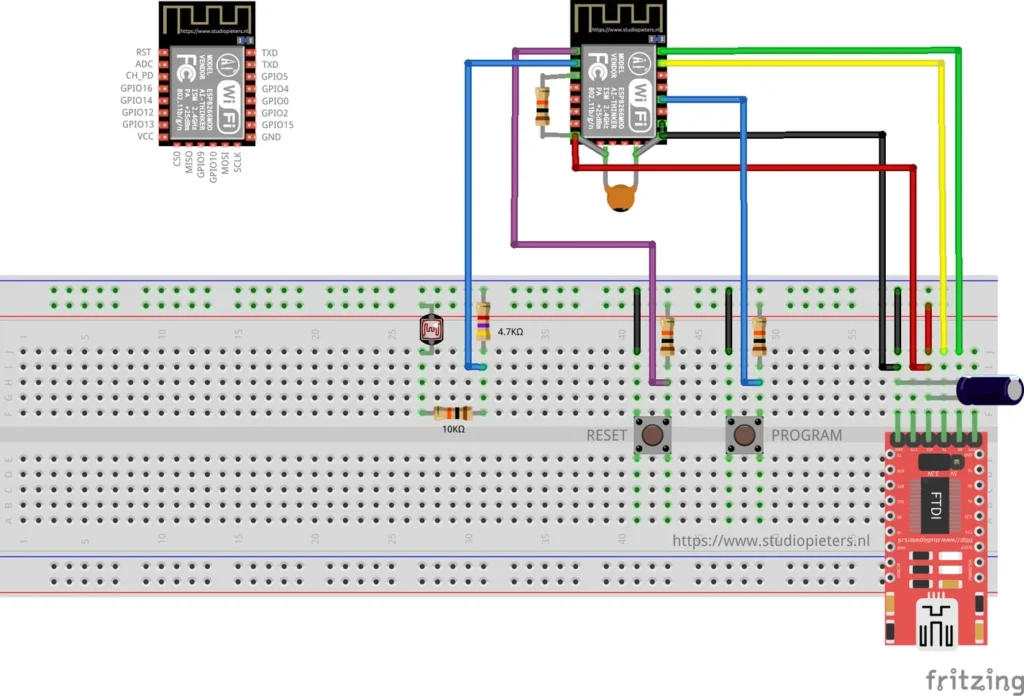
Can an ESP8266 measure how bright a room is, and show it in Apple Home as a light sensor? This is a very simple test to find out, with a light-dependent resistor (LDR) on the analog input.
The short answer: it works as a demonstration, but it does not give useful measurements, because an LDR on an analog input is not the right sensor for this. That makes it a good example of why the sensor choice matters. For real light readings, use a digital light sensor such as the one in the BH1750 digital light sensor guide.
The circuit
The breadboard diagram shows an ESP-12 module with an LDR, a 10 kΩ and a 4.7 kΩ resistor, which turn the resistance of the LDR into a voltage that the analog input can read, and RESET and PROGRAM buttons. An FTDI adapter powers the setup and programs the module. It is a test setup on a breadboard.
The analog input of the ESP8266 reads 0 to 1 V as a number from 0 to 1023.
The firmware
The firmware makes a HomeKit accessory with a light sensor service, the Current Ambient Light Level characteristic. Every 3 seconds it reads the analog input and reports the result to HomeKit. The LED on GPIO2 flashes in three groups of two when the accessory is identified.
analog_light_value = sdk_system_adc_read();
currentAmbientLightLevel.value.float_value = (1*100/(1000-analog_light_value));
homekit_characteristic_notify(¤tAmbientLightLevel, HOMEKIT_FLOAT((analog_light_value)));
vTaskDelay(3000 / portTICK_PERIOD_MS);The source says it plainly in a comment: HomeKit uses lux, so this is not a correct reading, and the code is a demonstration of this sensor type. The reason is that the analog value only says how much voltage the divider gives, and the relation between that voltage and lux depends on the LDR, the resistors and the light. It is not a calibrated measurement. The value that is sent to HomeKit is also the raw reading of the input, and not the result of the formula above it.
Build it
There is no over-the-air update in this firmware. Compile main.c the usual way, with the HomeKit SDK for the ESP8266, as described in ESP8266 HomeKit Garage Door. The Makefile in the Light_Sensor folder points to the components of the SDK two levels up, so it is built from inside the SDK.
The repository has one release, 0.0.1 of 11 September 2019.
What came out of it
The readings are not valuable: the sensor does not fit this project. The test did show what the ESP8266 can do with a single analog input, and that a HomeKit light sensor needs a value in lux. A digital sensor that measures lux itself is the better choice.
Good to know
- The HomeKit Accessory Protocol specification the firmware follows is the non-commercial version, for accessories you build yourself and do not distribute or sell.
- The repository is under the MIT licence. The HomeKit setup code is set in the firmware source, so change it to your own.
The project is in the ESP8266-HomeKit-Light-Sensor repository on GitHub.
Related
 HomeKit
 LED Strip Using 3 Standard Modules
* This project is featured on Instructables
Read more
HomeKit
HomeKit LED Strip Using 3 Standard Modules
* This project is featured on Instructables
Read more
 HomeKit
ESP8266 HomeKit Thermostat with OLED Display
A HomeKit thermostat on an ESP8266 that heats and cools, with a DHT22 sensor, a small OLED display and UP and DOWN buttons that change the set temperature by 0.5 degrees.
Read more
HomeKit
ESP8266 HomeKit Thermostat with OLED Display
A HomeKit thermostat on an ESP8266 that heats and cools, with a DHT22 sensor, a small OLED display and UP and DOWN buttons that change the set temperature by 0.5 degrees.
Read more
 HomeKit
ESP32-CAM as a HomeKit Camera
A proof of concept: the AI-Thinker ESP32-CAM as a camera accessory in the Apple Home app, with a still image and a stream that is not smooth.
Read more
HomeKit
ESP32-CAM as a HomeKit Camera
A proof of concept: the AI-Thinker ESP32-CAM as a camera accessory in the Apple Home app, with a still image and a stream that is not smooth.
Read more
More HomeKit
Keep building.
Switches, sensors, plugs and blinds: more accessories that you build yourself and add to the Home app.
All HomeKit