
3D printing
Building a 3D Printed Pit Droid, Part 1: The Plan
A 1:1 Pit Droid from the Podrace pits can't be bought, but you can print one, and this one is going to move. In this series I build it step by step, explain every word along the way, and show what it costs and what goes wrong.
- 3D printing
- Safety notes
- 7 min read
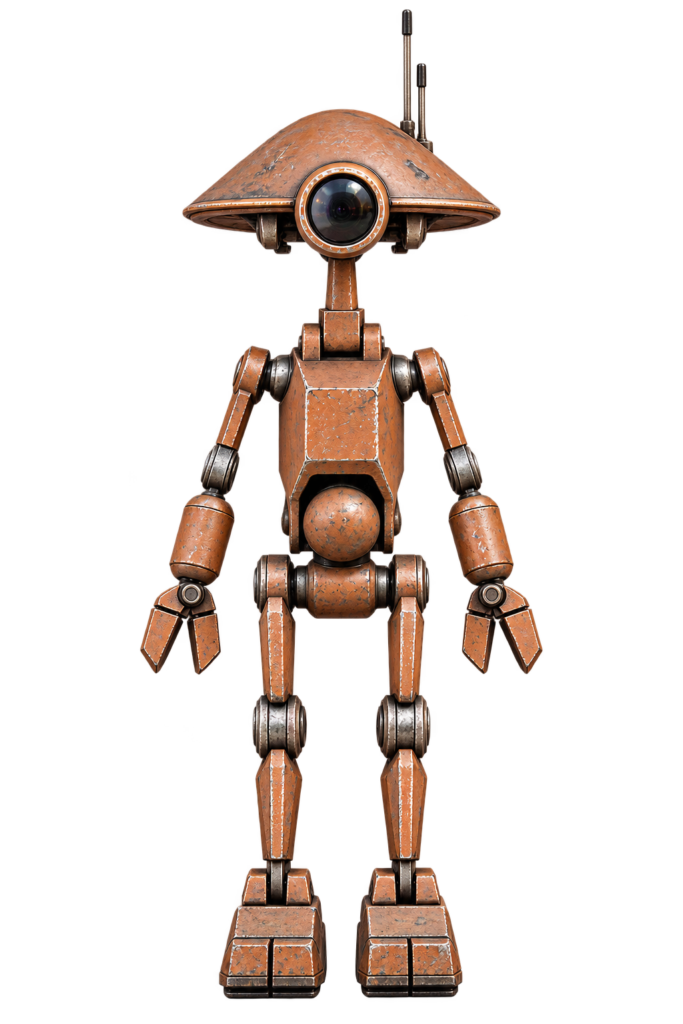
Hi, I’m Achim. I’m building a life-size Pit Droid from Star Wars: Episode I (you also see them in The Mandalorian), and this time he is going to move: he turns his head, tilts it, lifts his arms and twists at the waist.
I’m writing this blog while I build, so you see the real thing: the plan, the cost and the mistakes. If you’ve never built anything with servos or an Arduino, don’t worry. Every part is written so a total beginner can follow along. If a word is new to you, check the glossary at the bottom.
In this first part we only plan. By the end you know what we’re building, which level to choose, what it takes, and which mistakes to avoid. The shopping starts in Part 2.
What Are We Building?
| Droid | Pit Droid “PD-23” (2023 update of the Droid Division files) |
| Size | About 1200 mm tall (life-size) |
| Version | Animatronic: a posable droid with servo motors |
| Filament | 3 to 4 kg for the standard droid, plus about 0.5 to 1 kg for the animatronic parts (my estimate, I’ll log the real number in Part 3) |
| Printer | Minimum bed 220 x 220 x 250 mm (parts are also available split for smaller printers) |
| Difficulty | Standard droid: beginner. Animatronic: beginner with patience |
Who Made the Designs
The droid is by Droid Division. The animatronic upgrades (head mechanism, arm lift, waist swivel and backpack) were designed by Chris Osborne and released as charity files for DroidBuilders UK. Great work, thank you both!
A Note About the Files
The files are for one person’s own use. They may not be shared or resold, even when modified. That’s why I don’t publish any STL files on this blog.
- Buy the droid from the official shop: droiddivision.com. Keep your download link, because the files get updated.
- If you like Chris’s animatronic upgrades, please consider a donation: droidbuilders.uk/charity.
Choose Your Level
The animatronic parts work as separate upgrades. This is the best news for beginners: start small and add more later.
| Level | What moves | Servos | Difficulty |
|---|---|---|---|
| 0: Posable | Nothing automatic. You pose him by hand | 0 | 1 of 4 |
| 1: Head | Head turns left/right and nods up/down | 2 | 2 of 4 |
| 2: Head + arms | Level 1 plus both arms lift | 4 | 3 of 4 |
| 3: Full | Level 2 plus waist swivel | 5 | 4 of 4 |
My plan: build Level 3, but in the order 1, 2, 3, and test each step before I continue. If something doesn’t work, you then know exactly where to look.
Decide about the waist swivel now
It needs a different belly (and optional new hips) before you glue the torso together. Retrofitting later is a lot of work. Print the waist parts from the start, even if you add the servo later.
The Route and What Gets Replaced
The Route
The route is the same for every level. The extra animatronic steps are labelled “Animatronic”.
- Buy files and hardware (Part 2)
- Print the standard parts and the animatronic alternatives (Part 3)
- Clean up and test fit: remove supports, clear holes (Part 4)
- Legs, hips, belly and torso (Part 5). Animatronic: waist swivel here
- Arms and hands (Part 6). Animatronic: shoulder mechanism here
- Neck and head (Part 7). Animatronic: head mechanism here
- Electronics: servos, power, controller (Part 8). Animatronic: backpack here
- Programming, finishing and painting (Part 9)
Which Parts Are Replaced
This is where beginners most often get lost, so here it is in one table:
| Body part | Standard droid | Animatronic version |
|---|---|---|
| Head | Normal head files | Same head files, but use the animatronic head pivot parts |
| Neck | Normal neck and neck top | Animatronic neck, neck top, servo bracket and servo arm (or servo gears) |
| Shoulders | Normal shoulder joint | Bearing carrier, shoulder sleeve, arm lever and servo mounts (optional, per arm) |
| Belly and hips | Normal middle and hip | Belly main/front/back, hip adaptor (or new hip), servo clamp, shaft adaptor (optional) |
| Back | Plain back door | Optional backpack with room for battery and electronics |
| Everything else | Standard | Standard: legs, feet, arms, hands and torso stay the same |
How Do You Control Him?
You choose. There is no right answer, and it’s the most fun decision of the project.
- Puppet control: wired servo controllers with sliders or joysticks. The simplest way to start.
- Radio control (RC): a normal hobby transmitter and receiver. Fun for driving him live.
- Arduino or Pololu Maestro: a small board that plays pre-programmed movements, so he is independent.
- Something smarter: another builder connected a camera and an AI board so the head follows objects. Inspiring read: Goran Vuksic’s Pit Droid on Hackster.
My choice: I’ll start with a servo tester and puppet control to get everything working, then move to a microcontroller. Both are explained in Part 8.
Safety First
- Servos are strong. The big arm servos can exert serious force. Keep fingers away from moving parts and always centre the servos before you fit the arms.
- A moving droid can topple. Moving the heavy head can tip an unsupported droid over. Bolt him to a stand or use the feet clamps (Part 5).
- Glue (superglue/CA): work ventilated, wear gloves and glasses, and keep acetone and glue away from children.
- Sanding and drilling: wear a dust mask and eye protection. Clamp parts firmly.
- Electronics: never connect or change wiring while the power is on. Use a fuse or a power supply with overcurrent protection.
- Hot things: the printer nozzle and bed can burn you, and so can a hot-glue gun.
- Younger builders: great project, but with an adult nearby for the drilling, gluing and electronics.
Tools You Need
- A 3D printer, and a bed adhesive such as 3D lacquer
- Drill bits: 6 mm (bolts and dowel holes), 9 mm (cap nuts), 10 mm (barrel nuts)
- Allen keys, small saw, sandpaper, hobby knife, flush cutters
- Superglue (CA) and optionally a little hot glue
- A servo tester (cheap and very useful)
- A multimeter, for the electronics
- A flat, clean work surface
Printing Basics for Beginners
- Check your bed size first. Many parts come in “whole” and “split” versions. Use the split versions if your printer is small.
- Left and right: parts named “R” must be mirrored in your slicer for the left side. Parts named “L or R” need no mirroring. After mirroring, check that the same face is on the bed.
- Orientation matters. Use the orientation in the files, especially for the elbow “lollipops”. Don’t print them standing up, they will break.
- Supports: most parts need none. The info sheet says when they do. Some animatronic parts have odd-shaped holes on purpose, so they print without support.
- Tolerances: every printer is different. Joints are designed to be tight and need cleaning and a bit of sanding. Remove all support from joints. Don’t force parts, or they will split.
- Golden rule: loosen, pose, tighten.
My exact settings follow in Part 3.
Cost
I’m not going to guess a total. Prices vary a lot per country and shop, and servos range from cheap to very expensive. In Part 2 I keep a running cost table and fill it in with what I really pay. The big items are:
- Files (Droid Division and the animatronic files)
- Filament (about 4 to 5 kg)
- Servos, the main cost of the animatronic parts
- Power supply and controller
- Paint and finishing materials
Mistakes I Want You to Avoid
- Gluing the torso together before deciding about the waist swivel.
- Mixing up the left and right legs. The three small dots on the thigh are always at the back.
- Not testing the servos on a tester before gluing everything.
- Printing the animatronic head parts and the normal neck, and then wondering which one to use. You only need the animatronic ones.
Words Explained
- Animatronic: a figure moved by motors.
- Servo: a small motor that turns to a position you tell it.
- Servo tester: a small box with a knob that moves a servo, for testing and centring.
- PWM: the signal that tells a servo what position to go to.
- Slicer: software that turns an STL file into printer instructions.
- STL: the 3D file format used for printing.
- Supports: temporary printed structures that hold up overhangs.
- CA glue: superglue.
- Barrel nut, cap nut, furniture bolt: the bolt types from flat-pack furniture that we use for the joints.
- Bearing: a ring that lets a shaft turn smoothly.
- Dowel: a small pin that lines parts up for gluing.
Conclusion: Plan Done, Time to Shop
Next up: Part 2: Hardware & shopping list
Unofficial fan project
Pit Droid and Star Wars are trademarks of Disney/Lucasfilm. This site is not affiliated with, endorsed by or sponsored by Disney. The droid in this series is based on the PD-23 files by DroidDivision (Dave Moog), which are used under a single-person licence.
Related
 3D printing
Philips Hue Bridge Wall Mount
Some projects never really get old. Even though I created this one quite a while ago, it is still one of the most downloaded and requested designs on my site: The Philips Hue Bridge Wall Mount.
Read more
3D printing
Philips Hue Bridge Wall Mount
Some projects never really get old. Even though I created this one quite a while ago, it is still one of the most downloaded and requested designs on my site: The Philips Hue Bridge Wall Mount.
Read more
 Electronics
Door Lock with an ESP8266 and Homebridge
An ESP8266 that opens a door lock through a relay and a web request, shown as a lock in the Home app by a Homebridge plugin.
Read more
Electronics
Door Lock with an ESP8266 and Homebridge
An ESP8266 that opens a door lock through a relay and a web request, shown as a lock in the Home app by a Homebridge plugin.
Read more
More projects
Keep building.
Electronics, 3D printing and CNC builds, documented from the first idea to the last screw.
All projects