
Electronics
Building a micro-Duck, Part 1: The Plan
A small duck-shaped biped that walks with a model trained in simulation, built around an Arduino UNO Q. In this series I build it step by step, explain every word along the way, and show what it costs and what goes wrong.
- Arduino
- Safety notes
- 7 min read
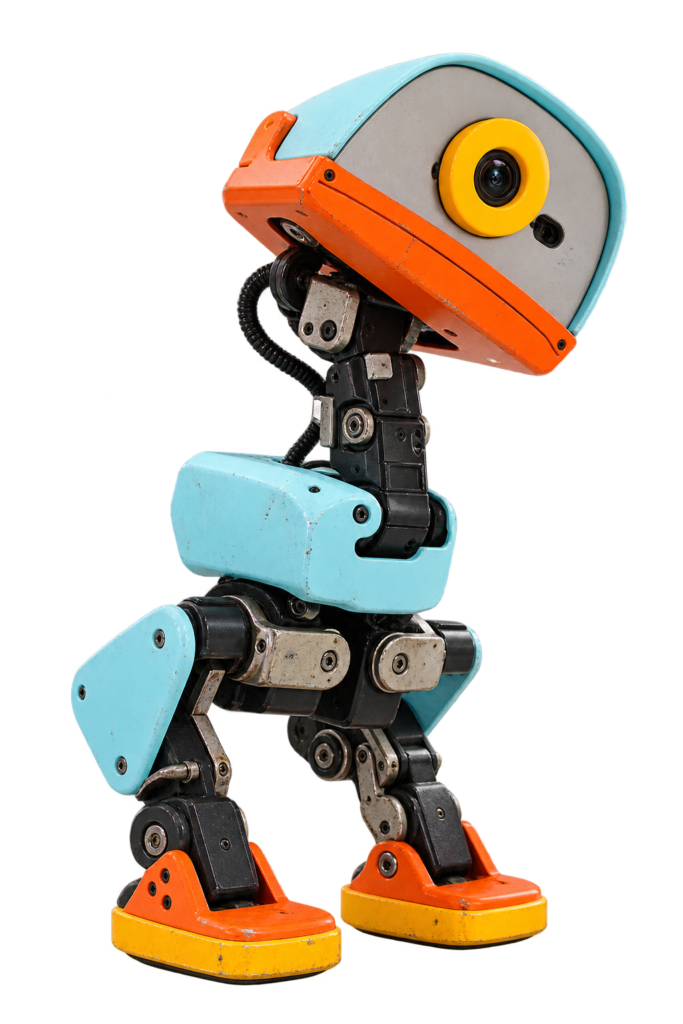
XGO-Duck is a small biped robot shaped like a duck: two legs, a neck, a head with a mouth, and a walk that was learned in a computer simulation before it ever touched a real floor. Luwu Dynamics published everything you need to build one in the xgoduck_hardware repository: 3D-printable parts, the electronics, the parts list and a 25-page assembly guide. I’m going to build it, and you can follow along, one small step at a time.
No robotics background? No problem. You don’t need to know what a servo or an IMU is yet. I’ll explain every new word the first time it shows up, tell you what each step does and why, and show you how to check that it worked.
Where this stands
I haven’t ordered or built anything yet. This part is the plan, based on the repository. Where the repository says something is still unfinished, or I don’t know, I say so.
Who Is This Series For?
- Beginners. If you can follow a recipe, you can follow this series. You do need a 3D printer and some patience.
- Younger builders. Go for it, but do the battery and wiring steps together with an adult.
- People who want to see the real thing. I’ll show the mistakes, the real costs and the parts that didn’t work the first time.
Safety comes first
3D printers get hot and the robot runs on a rechargeable lithium battery. I’ll put a safety note before every step where it matters. The repository itself warns to calibrate with the robot supported, and to avoid stalling the servos while testing.
How Every Part Works
- What you’ll do in this part, and what you need.
- Safety first, before any step that needs it.
- Numbered steps. For each one: what to do, what’s happening, and why.
- A check after each step: “Good result” and “Bad result”.
- If it didn’t work: the common problems and how to fix them.
- Words explained at the end of each part.
What Is XGO-Duck?
XGO-Duck has 15 servos: 10 in the legs, 4 in the neck and head, and 1 for the mouth. The walking model controls 14 of them, and the mouth servo is driven separately. The brain is an Arduino UNO Q. It is two computers on one board: a Linux side that runs the walking model and a web page, and a small microcontroller that talks to the servos and the motion sensor. A custom expansion board from Luwu Dynamics connects the servos, the battery and the motion sensor (a QMI8658A IMU) to it.
The walk was trained with reinforcement learning: a computer practises walking millions of times in a virtual world, gets a score for each try, and slowly gets better. The result is a “policy” that looks at what the robot senses and decides how every joint should move. You don’t have to train anything: the runtime already contains walk, get-up and pick policies, plus a roller-skating walk and a roll move, and you control the robot from a web page in your browser. The FAQ says to start with those bundled policies.
Which Duck Is This?
This series has been through a change of plan, so this is worth spelling out. I first planned the OpenELAB MicroDuck, which is built around a Raspberry Pi Zero 2 W. I switched to XGO-Duck because its repository gives me one matched set: the printable parts, the electronics, the software and the assembly guide all come from the same place. Three robots share the name or the shape, and they are not the same:
| XGO-Duck (this series) | Pollen Robotics Microduck | |
|---|---|---|
| What it is | A DIY build from Luwu Dynamics, adapted from Microduck. | The original robot from Pollen Robotics. |
| Brain | Arduino UNO Q plus a Luwu expansion board | Radxa Zero 3 |
| Servos | 15 Feetech 1910 serial servos | 15 servos on one shared bus |
| Motion sensor | QMI8658A on the expansion board | A custom board on the servo bus |
| Software | xgoduck_runtime_arduino | pollen-robotics/microduck |
XGO-Duck credits Pollen for the duck form, the 15-servo layout and the order of the joints. The FAQ is clear that Microduck software and policies cannot be used unchanged on XGO-Duck: the servos, geometry and calibration differ, so a walking model only fits the robot it was trained for. I use Luwu’s runtime and policies, and I keep Pollen’s simulator in mind for Part 9.
What Will It Cost?
The repository’s FAQ gives a build estimate of about US$400 and says plainly that this is an estimate, not an offer. I don’t know yet what I will pay, so I leave the total open and fill it in with real receipts in Part 2.
| Item | Cost |
|---|---|
| Arduino UNO Q* (2 GB or 4 GB) | Also sold by Arduino. Not part of the Luwu electronics kit. |
| Electronics kit from Luwu Dynamics | Contains everything in the parts list except the UNO Q. |
| 15 Feetech 1910 servos* | The biggest cost. I’ll check current prices in Part 2. |
| 3D printer, filament, multimeter | Not included. You need these on top. |
What I Want to Achieve
- A robot that stands up and walks with the ready-made policies.
- Driving it from the web page on my phone or laptop, without cables.
- If that works: the get-up, the pick move and the mouth, and then a look at training my own walk with the XGO-Duck training repository.
What I Don’t Know Yet
The repository is honest about what is unfinished, and I’d rather repeat that than hide it.
- The print settings. The files say a complete, tested print profile is still to be documented. I print one servo mount and one bearing seat first to check the fit.
- The battery. The parts list asks for an 18650 pack at 8.4 V with an XH2.54 connector, over 3,500 mAh and over 3C, but names no product, and says the exact pack, charger and polarity still need to be confirmed. I check this with a multimeter before I connect anything.
- The zero positions. The build guide says a photo set for the mechanical zero of every joint is still needed. I calibrate each joint myself.
- The licence. There is no licence file yet. See Part 2 for what that means for this site.
- How well the walk works on my robot. No hardware tests are recorded in the documentation, so my build may be one of the first. It may fall over.
The Plan in Nine Parts
| Part | What happens |
|---|---|
| 1 | The plan (this part) |
| 2 | The hardware: ordering the parts |
| 3 | Printing the parts |
| 4 | Setting up the electronics and the servos |
| 5 | Building the legs, feet and body |
| 6 | The head, neck and mouth |
| 7 | Installing the software on the UNO Q |
| 8 | Calibration and the first steps |
| 9 | Updates and what comes next |
Each part is published when the step is finished, so you’ll see my mistakes too, and the plan may change along the way.
Words Explained
- Biped: a robot that walks on two legs.
- Servo: a small motor that turns to an exact position and holds it.
- Serial servo: a servo you chain together on one cable. Each one has its own ID number.
- Arduino UNO Q: a board with a Linux computer and a microcontroller together.
- IMU: a motion sensor that measures tilt and movement.
- Reinforcement learning: teaching a computer by trial and error.
- Policy / ONNX: the trained walking skill, stored in a standard file format.
- Open source: the designs and code are public. What you may do with them depends on the licence.
Conclusion: A Small Duck with a Big Idea
A robot that learned to walk in a simulator is within reach of a hobbyist, as long as I’m honest about what is still open. Next up: the shopping list.
Small duck, big steps. Happy hacking!
Unofficial fan project
XGO-Duck is an open-source robot by Luwu Dynamics, based on Microduck and microduck_rl by Pollen Robotics. Training uses mjlab and BAM by Rhoban. This site is not affiliated with Luwu Dynamics, Pollen Robotics, Rhoban or Arduino, and none of them endorse this series.
Related
 Electronics
NeoPixel Light with an ESP8266 and Homebridge
An ESP8266-12E that drives a 144-pixel NeoPixel strip and answers the requests of a Homebridge plugin.
Read more
Electronics
NeoPixel Light with an ESP8266 and Homebridge
An ESP8266-12E that drives a 144-pixel NeoPixel strip and answers the requests of a Homebridge plugin.
Read more
 3D printing
Building a 3D Printed Pit Droid, Part 1: The Plan
A 1:1 Pit Droid from the Podrace pits can't be bought, but you can print one, and this one is going to move. In this series I build it step by step, explain every word along the way, and show what it costs and what goes wrong.
Read more
3D printing
Building a 3D Printed Pit Droid, Part 1: The Plan
A 1:1 Pit Droid from the Podrace pits can't be bought, but you can print one, and this one is going to move. In this series I build it step by step, explain every word along the way, and show what it costs and what goes wrong.
Read more
 Electronics
Switch a Led over MQTT with an ESP-01
An ESP-01 that subscribes to an MQTT topic and switches a led on and off, the starting point for MQTT devices.
Read more
Electronics
Switch a Led over MQTT with an ESP-01
An ESP-01 that subscribes to an MQTT topic and switches a led on and off, the starting point for MQTT devices.
Read more
More projects
Keep building.
Electronics, 3D printing and CNC builds, documented from the first idea to the last screw.
All projects