
Reference
NFC NTAG215 Stickers: What They Are and How to Program Them
What an NFC NTAG215 sticker is, how a tag with no battery can talk to your phone, and what it is used for. Plus how to program one with a free phone app or an ESP32 and PN532, and how to lock it.
- ESP32
- Safety notes
- 8 min read
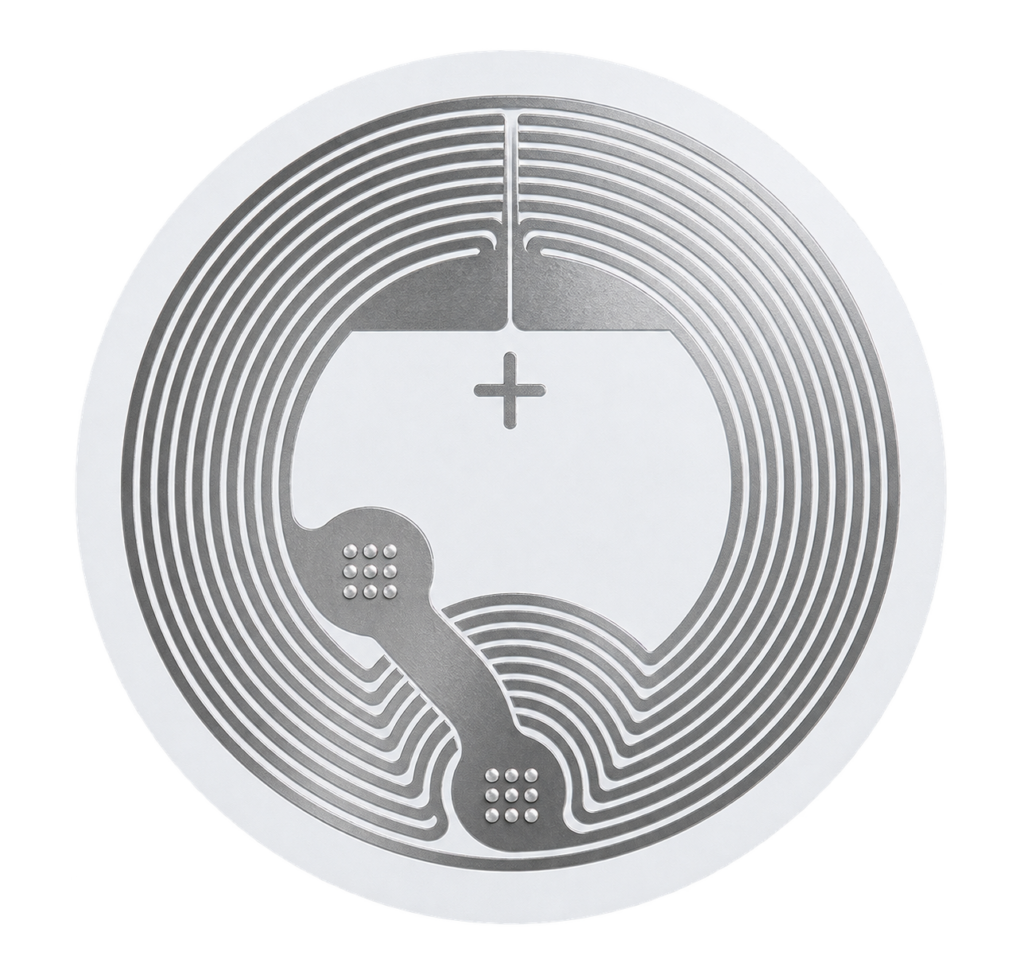
An NTAG215 sticker is a small, flat NFC tag: a paper-thin adhesive label with a chip and a coil antenna inside. It has no battery and no wires. When a phone comes within a few centimetres, the phone powers the chip through the antenna and reads or writes a tiny bit of data. Because it is cheap, durable and works with the NFC reader every modern phone already has, it is one of the easiest ways to make a physical object trigger something digital.
What is an NTAG215?
NTAG215 is an NFC chip made by NXP. The sticker you buy is that chip plus an antenna, mounted on an adhesive label, usually round and 25 to 30 mm across. The chip is built to the NFC Forum Type 2 Tag standard and works at 13.56 MHz (ISO/IEC 14443-A), the same radio band as the cards used with the RC522 and the PN532.
The family has three sizes: NTAG213 (144 bytes), NTAG215 (504 bytes) and NTAG216 (888 bytes) of user memory. The NTAG215 is the middle one, big enough for a URL plus some extra text or a few records, and it is the most widely sold of the three for hobby use.
Passive means no power needed
The tag has no supply of its own. Everything it does happens while a reader is close enough to power it, so a sticker can sit on a wall for years without maintenance.
How does it work?
- The reader sends out a field. A phone or reader module produces a 13.56 MHz magnetic field around its antenna.
- The tag powers up. The coil in the sticker picks up that field through induction and gives the chip just enough power to run. This only works at very short range, which is why you have to tap the phone against the tag.
- They talk. The reader asks the tag for its 7-byte unique ID (UID) and then reads or writes pages of memory.
- The phone acts on the data. If the memory holds an NDEF message, for example a URL, the phone opens the link, starts an app or runs an automation.
NDEF (NFC Data Exchange Format) is the standard way to store a message on a tag so that every phone understands it. A message consists of one or more records, such as a URL, plain text, a Wi-Fi login or a phone number.
Specifications
| Property | NTAG215 |
|---|---|
| Standard | NFC Forum Type 2 Tag, ISO/IEC 14443-A |
| Frequency | 13.56 MHz |
| Total memory | 540 bytes in 135 pages of 4 bytes |
| User memory | 504 bytes |
| NDEF data area | 496 bytes (as announced in the capability container) |
| UID | 7 bytes, set by the manufacturer and not changeable |
| Write endurance | 100,000 cycles |
| Data retention | 10 years |
| Protection | 32-bit password, optional limit on wrong attempts |
| Extras | NFC read counter, UID and counter ASCII mirror, originality signature |
Figures are from the NXP NTAG213/215/216 datasheet. The real range depends on the antenna size, the phone and what the sticker is stuck to, expect a few centimetres.
What is it used for?
- Smart-home triggers: tap your phone on a sticker by the bed to run a “Good night” scene, or by the front door to switch on the hallway light.
- Open a link or app: a sticker on a product, poster or business card that opens a web page, a menu or a review form.
- Share Wi-Fi: a sticker that lets guests join your network with one tap instead of typing a password.
- Contact and info: a phone number, e-mail address or contact card behind a tap.
- Check-in and logging: tap to start a timer, log a workout, mark a task as done or record that a plant was watered.
- Inventory and labels: mark boxes and tools, with each tag opening a record in your own system.
- Games and collectibles: NTAG215 is the chip type used in figures for some game consoles, which is a big reason blank stickers are easy to find.
- DIY electronics: use the tag as a key or ID for an ESP32 project, read with a PN532 or RC522 module.
Does my phone support it?
| Phone | Reading | Writing |
|---|---|---|
| iPhone XS and newer | Yes, in the background, no app needed | Yes, with an app such as NFC Tools |
| iPhone 7 to X | Yes, but an app must be open | Yes, with an app |
| Android with NFC | Yes, NFC must be switched on in settings | Yes, with an app such as NFC Tools or NXP TagWriter |
If an old or cheap Android phone does not react, check that NFC is enabled and find where the NFC antenna sits, it is usually near the camera or in the middle of the back.
How do I program a tag with my phone?
This is the easiest way and needs no hardware besides the tag.
- Install a free app such as NFC Tools (iPhone and Android) or NXP TagWriter (Android).
- Open the app, go to Write and choose Add a record.
- Pick the record type, for example URL / URI, and enter the address.
- Tap Write and hold the back of the phone on the sticker until the app confirms.
- Test it: lock the screen, wake it and tap the tag again.
Run a shortcut or a Home scene on an iPhone
A URL record opens a link. To run something on the phone, such as an Apple Home scene, use an NFC automation instead:
- Open the Shortcuts app, go to Automation and tap New Automation.
- Choose NFC, tap Scan and hold the iPhone on the sticker. Give the tag a name.
- Add the action, for example Control Home to run a scene.
- Optionally switch off Ask Before Running so it runs straight away.
The automation recognises the tag by its unique ID, so it works with an empty tag as well. You do not need to write anything to it first.
How do I program a tag with an ESP32?
With a PN532 module on an ESP32 you can write tags from your own project, for example to prepare a batch of stickers with different URLs. Wire the PN532 over I2C as described in that guide (SDA to GPIO21, SCL to GPIO22) and install the “Adafruit PN532” library.
Arduino code: write a URL to an NTAG215
#include <Wire.h>
#include <Adafruit_PN532.h>

Adafruit_PN532 nfc(-1, -1); // I2C mode, no IRQ/reset pins wired

void setup() {
  Serial.begin(115200);
  Wire.begin(21, 22);
  nfc.begin();
  if (!nfc.getFirmwareVersion()) {
    Serial.println("Didn't find PN532 board");
    while (1) delay(10);
  }
  nfc.SAMConfig();

  Serial.println("Hold an NTAG215 tag against the reader...");
  uint8_t uid[7];
  uint8_t uidLength;
  if (!nfc.readPassiveTargetID(PN532_MIFARE_ISO14443A, uid, &uidLength)) return;

  if (uidLength != 7) {
    Serial.println("Not an NTAG (expected a 7 byte UID)");
    return;
  }

  // Writes one NDEF URI record. 0x04 = the "https://" prefix.
  char url[] = "studiopieters.nl";
  if (nfc.ntag2xx_WriteNDEFURI(0x04, url, sizeof(url) - 1)) {
    Serial.println("Done: https://studiopieters.nl written");
  } else {
    Serial.println("Write failed, is the tag locked?");
  }
}

void loop() {}
The function ntag2xx_WriteNDEFURI() comes with the Adafruit library. The first argument is a prefix code that saves space on the tag: 0x01 is http://www., 0x02 is https://www., 0x03 is http:// and 0x04 is https://. The library also has ntag2xx_ReadPage() and ntag2xx_WritePage() for working with raw 4-byte pages.
The function names and prefix codes were checked against the library header. This sketch was not run on hardware for this guide, so test it on a spare sticker first.
Locking and protecting a tag
By default anyone with a phone can overwrite your tag. There are two ways to prevent that:
- Lock it read-only. Most apps have a “Lock tag” option. This is permanent: it cannot be undone and the tag can never be changed again.
- Set a password. The NTAG215 supports a 32-bit password. The settings live in configuration pages 0x83 to 0x86, and the AUTH0 byte sets from which page the password is required. A password can protect writing only, or reading as well.
Think before you lock
Only lock a tag once you are completely sure about its content. A wrong URL on a locked sticker means throwing the sticker away. Keep a few spares while you experiment.
Practical tips
- Metal kills the signal. A normal sticker on a metal surface will often not work at all, because the metal detunes the antenna. Use an anti-metal (ferrite-backed) tag for metal, or put a thin non-metal spacer under the sticker.
- Do not fold or cut the sticker. The antenna coil runs round the edge of the label, so damage there makes the range worse or kills it.
- Test before you stick. Write and test the tag while it is still on its backing, then stick it down. Peeling it off again can bend the antenna.
- Keep the content short. A short URL leaves room to change things later. For long or changing content, point the tag at a short link on your own domain and change the destination there.
- Check the chip. Cheap listings sometimes mislabel NTAG213 as NTAG215. An app like NFC Tools shows the real chip type and size under Read.
- Privacy. Anything written in plain text on a tag can be read by any phone that taps it. Never store passwords or personal data on one.
Conclusion
An NTAG215 sticker is a cheap, battery-free way to link a physical spot to something on your phone: a web page, a Wi-Fi login or a smart-home scene. Writing one takes a minute with a free app, and with a PN532 and an ESP32 you can automate it in your own projects. Remember the three things that trip people up: permanent locking, metal surfaces and look-alike NTAG213 chips.
Related
 Reference
Seeed Studio XIAO ESP32C3 Pinout
The real pin reference for Seeed Studio's XIAO ESP32C3: a thumbnail-sized RISC-V Wi-Fi/BLE board with a U.FL antenna connector and no onboard LED.
Read more
 Guide
ESP32-WROOM-32D Pinout
The complete pin reference for the ESP-WROOM-32D module: 34 programmable GPIOs, ADC/DAC, touch, RTC and the exact pins you can safely reuse.
Read more
 Guide
HC-05 Bluetooth Module Pinout
The complete pin reference for the HC-05: a UART-to-Bluetooth bridge available as a bare 34-pin module or a simple 6-pin breakout board.
Read more
More guides
Keep building.
From ESP32 HomeKit accessories to Arduino and ATtiny reference guides, there’s more where this came from.
All guides