
Software
ESP32 DHT Driver for ESP-IDF
A driver for DHT11, DHT22 (AM2301) and Si7021 temperature and humidity sensors on the ESP32, packaged as an ESP-IDF component with an example.
- ESP32
- ESP-IDF
- 2 min read
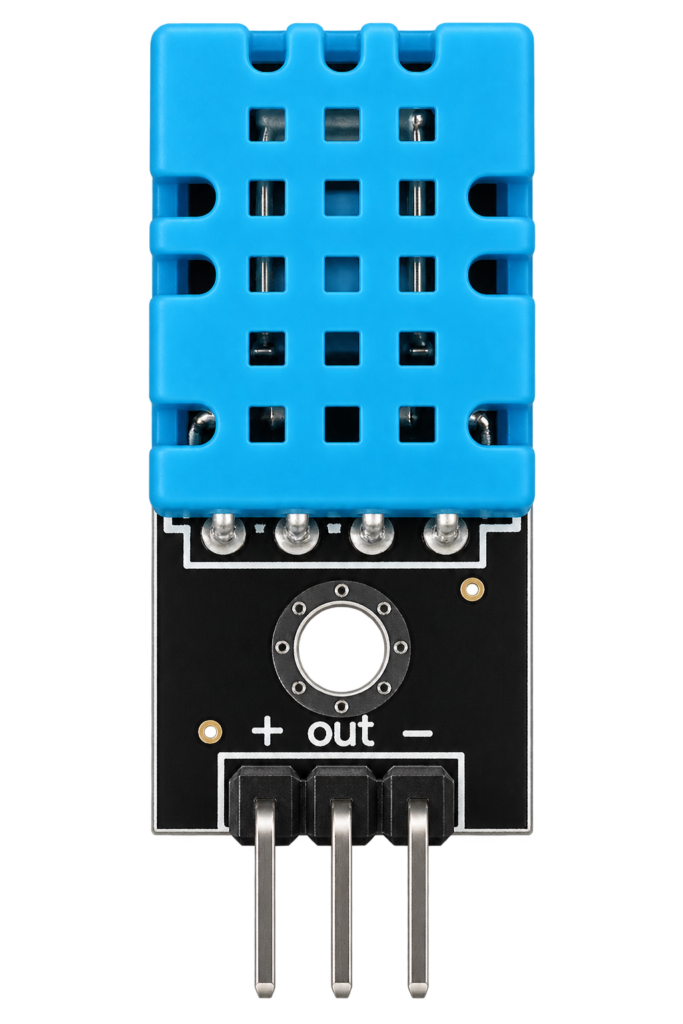
A driver for DHT temperature and humidity sensors on the ESP32, written for ESP-IDF. It reads the DHT11, the AM2301 (also sold as DHT22) and the Si7021, and comes with an example that prints the temperature and humidity every 2 seconds.
The component
| Property | Value |
|---|---|
| Name and version | esp32-dht, 1.0.2 |
| Requires | ESP-IDF 5.0 or newer |
| Targets | ESP32, ESP32-C2, ESP32-C3, ESP32-C5, ESP32-C6, ESP32-C61, ESP32-S2 and ESP32-S3 |
| Licence | MIT |
The repository is packaged as an ESP-IDF component. One way to use it is as a dependency in the idf_component.yml of your project:
dependencies:
  esp32-dht:
    git: https://github.com/AchimPieters/esp32-dht.git
The header dht.h has two functions, and both take the sensor type, the GPIO the data pin is on, and give back the humidity and the temperature:
| Function | Returns |
|---|---|
| dht_read_float_data | Humidity and temperature as floating point numbers |
| dht_read_data | Humidity and temperature as 16-bit integers |
The sensor type is one of DHT_TYPE_DHT11, DHT_TYPE_AM2301 or DHT_TYPE_SI7021.
Wiring
| DHT sensor pin | ESP32 connection |
|---|---|
| VCC | 3.3 V |
| GND | Ground |
| Data | The configured GPIO, 17 by default, with a pull-up resistor |
The data line needs a pull-up resistor, typically 10 kΩ, between the data pin and 3.3 V. If your sensor is on a breakout board that already has one, you can enable the internal pull-up in menuconfig instead. Use an external pull-up if your breakout board has none.
For how these sensors compare with the alternatives, see the BME280 guide and the SHT sensor series guide.
Configuration
The example is configured with idf.py menuconfig, under Example Configuration.
| Setting | What it does | Default |
|---|---|---|
| Sensor type | DHT11, AM2301/DHT22 or Si7021 | AM2301/DHT22 |
| Data GPIO number | The GPIO the data pin is on | 17 |
| Internal pull-up | Enables the internal pull-up resistor on the data line | Disabled |
Example code
Reading the sensor takes one call. The example picks the sensor type and the GPIO from menuconfig, sets the pull-up, and reads in a loop with a 2 second delay:
float humidity = 0, temperature = 0;
esp_err_t result = dht_read_float_data(sensor_type, gpio_num, &humidity, &temperature);
if (result == ESP_OK) {
    ESP_LOGI(TAG, "Humidity: %.1f%% Temperature: %.1f°C", humidity, temperature);
} else {
    ESP_LOGE(TAG, "Failed to read sensor data: %s", esp_err_to_name(result));
}
vTaskDelay(pdMS_TO_TICKS(2000));
Build, flash and watch the output with idf.py build, idf.py flash and idf.py monitor. The output looks like this:
I (12345) example_main: Humidity: 50.0% Temperature: 22.5°C
I (14345) example_main: Humidity: 50.1% Temperature: 22.6°C
Good to know
- Check that the wiring is right and that the GPIO in menuconfig matches it.
- Use an external pull-up resistor if your breakout board does not have one.
- For stable readings, keep the sensor out of rapid changes in temperature or humidity.
- The repository is under the MIT licence.
Everything is in the esp32-dht repository on GitHub.
Related
 Electronics
NeoPixel Strip over MQTT with a NodeMCU
A NodeMCU that sets on, brightness, hue and saturation of a 16-pixel NeoPixel strip over MQTT.
Read more
Electronics
NeoPixel Light with an ESP8266 and Homebridge
An ESP8266-12E that drives a 144-pixel NeoPixel strip and answers the requests of a Homebridge plugin.
Read more
Electronics
NeoPixel Strip over MQTT with a NodeMCU
A NodeMCU that sets on, brightness, hue and saturation of a 16-pixel NeoPixel strip over MQTT.
Read more
Electronics
NeoPixel Light with an ESP8266 and Homebridge
An ESP8266-12E that drives a 144-pixel NeoPixel strip and answers the requests of a Homebridge plugin.
Read more
 Software
ESP32 SHT3x Driver for ESP-IDF
A driver for Sensirion SHT3x temperature and humidity sensors on the ESP32, packaged as an ESP-IDF component with an I²C example.
Read more
Software
ESP32 SHT3x Driver for ESP-IDF
A driver for Sensirion SHT3x temperature and humidity sensors on the ESP32, packaged as an ESP-IDF component with an I²C example.
Read more
More projects
Keep building.
Electronics, 3D printing and CNC builds, documented from the first idea to the last screw.
All projects