
Electronics
Building a Budget BD-X Droid, Part 2: The Hardware
Every part you need for the budget BD-X droid, what it does, and where to order it. One shopping list for about €426, with a checklist for when the boxes arrive.
- Safety notes
- 9 min read
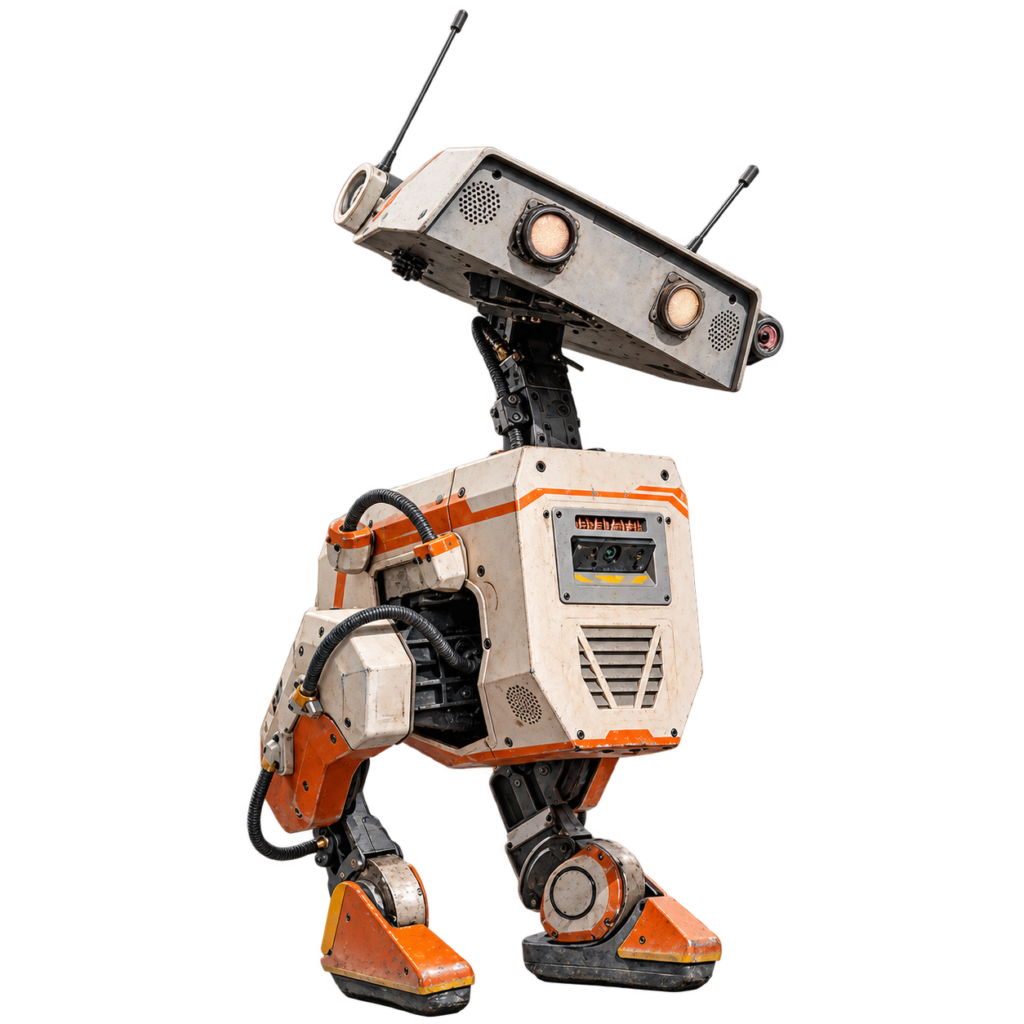
Update, October 22, 2026
I came across the XGO-Duck and decided to build that robot first, before I continue with this project. You can follow it in the micro-Duck series.
Without parts there is nothing to build. In this part we order everything for the robot, together. You get one complete shopping list, a short explanation of what every part does, and a checklist for when the boxes arrive.
No electronics experience? No problem. You don’t need to know what a regulator or a bearing is. For every part I tell you what it does, so you know why you’re buying it.
Affiliate links
Some of the links in this article are affiliate links. If you buy through them, I may earn a small commission, at no extra cost to you. It doesn’t change which parts I pick.
What You’ll Do in This Part
- Make three small decisions before you order.
- Order the parts from the shopping list.
- Gather the tools you need besides the parts.
- Check your order when it arrives.
This part is about ordering. I haven’t ordered or received anything yet while writing this, so what follows is the plan, built on the project’s official bill of materials. Prices come from that list and may have changed.
Before You Order
Ordering and batteries
If you’re young, order together with an adult. The battery cells are lithium-ion cells: don’t drop, pierce, short-circuit or charge them with the wrong charger. I’ll put a safety note before every step where it matters.
Decision 1: spare servos? The robot needs 14 servos. I’m ordering 16, so one broken motor doesn’t stop the project. That’s my suggestion, not part of the official list. It costs €28.
Decision 2: the expression package now or later? The eyes, antennas and speaker come in Part 8. If you order them now, you only have to order once. If you wait, you only buy them once the robot walks. Either way is fine. The package costs about €38, because several parts are only sold in bulk.
Decision 3: the motion sensor. The €40 sensor is the most expensive small part. The project’s author says he saw much cheaper ones but hasn’t tried them. This series uses the one from the list, because it’s the one that’s known to work with the guide.
The Shopping List
The list is grouped by what the part is for, so you can see how the robot fits together. The Shop column says where I plan to order each part. Prices are the ones from the project’s official list, in euros. They are estimates: I haven’t checked what the shops charge today, so look at the product page before you pay.
The list at a glance
| Group | Items | Subtotal |
|---|---|---|
| Motors and control | 3 | €235.66 |
| Brain and sensors | 4 | €80.08 |
| Power and battery | 8 | €51.87 |
| Cables and mechanical parts | 5 | €38.49 |
| Printing | 1 | €20.00 |
| Total (with 2 spare servos) | 21 | €426.10 |
Check before you buy
- Servos: the 7.4 V version (“19 kg·cm”), not the 12 V one.
- Charger and protection board: both must be for 2 cells in series (2S).
- Raspberry Pi: the Zero 2 W, not the older Zero. It may come without pin headers.
- XT30 (not XT60) and 2.1 mm barrel jacks: the size has to match.
- Bus servo adapter: model (A), not (B).
- Battery cells and microSD card: buy from a seller you trust. Fake cells and fake cards exist.
Motors and control (€235.66)
| Part | How many | Price | Shop | What it does |
|---|---|---|---|---|
| Feetech STS3215 servo, 7.4 V (19 kg·cm) | 16 (14 + 2 spare) | €224.00 | AliExpress | The motors in the joints. Each one turns to an exact angle and holds it. The robot needs 14. The two spares are my suggestion, in case one breaks. |
| Waveshare bus servo adapter (A) | 1 | €5.00 | AliExpress | Lets the Raspberry Pi talk to all 14 servos over one cable. |
| 9 g micro servo | 2 | €6.66 | AliExpress | Small servos that wiggle the antennas. |
Brain and sensors (€80.08)
| Part | How many | Price | Shop | What it does |
|---|---|---|---|---|
| Raspberry Pi Zero 2W | 1 | €26.08 | AliExpress | The robot’s brain: a tiny computer. |
| microSD card (32 GB) | 1 | €10.00 | AliExpress | The Raspberry Pi’s storage. The robot’s software lives here. The software image is made for a 32 GB card. |
| BNO055 motion sensor (IMU) | 1 | €40.00 | Amazon.fr | Tells the robot which way is up and how it is tilting. This is the most expensive small part. |
| Foot switches, type SS-10 | 4 | €4.00 | AliExpress | Tiny switches in the feet that tell the robot when a foot touches the ground. Only two are wired up, so two are spare. |
Power and battery (€51.87)
| Part | How many | Price | Shop | What it does |
|---|---|---|---|---|
| 18650 battery cells | 2 | €10.00 | nkon | The battery. The project’s author recommends the strongest cells you can find: his are 3000 mAh and can deliver 30 A. |
| Holder for 2 × 18650 cells | 1 | €4.99 | AliExpress | Holds the two battery cells. |
| 2S BMS (battery protection board) | 1 | €8.40 | AliExpress | Protects the two cells, for example against overcharging and short circuits. |
| 5 V regulator (UBEC) | 1 | €4.00 | Alibaba | Turns the battery’s voltage into a steady 5 V for the Raspberry Pi. The Pi is never connected straight to the battery. |
| Small power switch | 1 | €4.49 | AliExpress | Turns the robot on and off. |
| USB-C charger | 1 | €9.99 | AliExpress | Charges the battery. It must be able to charge two lithium-ion cells in series (2S). |
| 2.1 mm barrel jack | 2 | €2.00 | AliExpress | Plugs for the power wiring. |
| XT30 connectors | 1 bundle | €8.00 | AliExpress | A connector pair for the battery lead. You only need one pair, but they are sold in bundles. |
Cables and mechanical parts (€38.49)
| Part | How many | Price | Shop | What it does |
|---|---|---|---|---|
| Cable sheath | 1 | €9.00 | AliExpress | A sleeve that bundles and protects the wires. |
| Micro-USB to USB-C cable, 15 cm | 1 | €7.00 | AliExpress | A short USB cable used inside the robot. |
| Micro-USB to USB-C cable, 50 cm | 1 | €6.00 | AliExpress | A longer USB cable used inside the robot. |
| M3 heat-set inserts | 1 set | €5.99 | AliExpress | Little metal nuts that you melt into the printed parts, so screws have something strong to hold on to. |
| Bearings | 3 | €10.50 | AliExpress | Let the head and body parts turn smoothly. |
Printing (€20.00)
| Part | How many | Price | Shop | What it does |
|---|---|---|---|---|
| PLA filament, about 500 g | 1 | €20.00 | AliExpress | The plastic for printing the body. Free if you already have some. The TPU for the foot soles costs next to nothing. |
The total
The robot with two spare servos comes to €426.10. The official list without the spares is €398.10. The expression package adds about €38.
Optional: the expression package (about €38)
| Part | How many | Price | Shop | What it does |
|---|---|---|---|---|
| Speaker | 1 | €6.00 | AliExpress | The robot’s voice. |
| MAX98357 amplifier | 1 | about €10 | AliExpress | Drives the speaker. Only sold as a pack of 2. |
| LEDs | 3 | about €10 | AliExpress | The glowing eyes and the projector light. Only sold as a pack of 50. |
| Eye diffusers | 4 | about €10 | Amazon.fr | Soften the LED light so the eyes glow. Only sold as a pack of 60. |
| Projector reflector | 1 | €2.00 | AliExpress | Part of the small projector in the head. |
The official list also has a microphone (€15) and a camera (€5). The project hasn’t integrated them yet, so I’m skipping them.
Guides for These Parts
Want to know more about a part before you order it? These guides on this site go through the details:
- Raspberry Pi Zero 2 W, the brain of the robot, and what to check about its header.
- Feetech STS3215 7.4 V servo, the joint servo, including the voltage limit.
- Waveshare bus servo adapter (A), how it connects the Raspberry Pi to the servos.
- Adafruit BNO055 motion sensor, what it measures and how to calibrate it.
- 2S BMS, the battery protection board.
- 2S USB-C charger module, and why it charges at 1.1 A.
- 8A UBEC, the regulator that gives the Raspberry Pi its 5 V.
- MAX98357 amplifier, the little amplifier that drives the speaker.
What You Need Besides the Parts
These aren’t on the official list, and the project doesn’t give prices for them:
- A 3D printer, with PLA and TPU filament.
- A soldering iron and solder, and some wire.
- M3 screws. The guide mentions M3×10 and M3×6, but the total number isn’t in the guide yet. An assortment box with different lengths is a safe choice.
- Blue threadlocker (Loctite 243), for the screws that go into the motors.
- An Xbox One controller to steer the robot.
- A computer to put the software on the SD card.
Check whether the Raspberry Pi you buy has its pin header already soldered on. The wiring uses its GPIO pins, and without a header you would have to solder wires directly to it.
The 3D Printed Parts
Most of the robot is printed. The print guide lists 36 files, which make 51 parts. Print them in standard PLA with 15% infill, except the foot soles (foot_bottom_tpu.stl), which are TPU at 40%.
Don’t print everything at once. Print one foot and one structural joint first, and check that the servos and inserts fit. We do that in the next part.
When the Boxes Arrive
Check everything before you start building. A wrong part now is easier to fix than a wrong part halfway through.
- Count the servos. You should have 16 large servos and 2 small ones.
Good result: every servo is the same type.
Bad result: the number is off. Contact the shop now. - Check the label on the servos. They must be the 7.4 V version, also sold as “19 kg·cm”.
Bad result: a 12 V or “30 kg·cm” label. Those don’t fit this battery. Send them back. - Check the battery cells. Two lithium-ion cells of the type you ordered, undamaged.
- Check the Raspberry Pi and the charger. Make sure the charger really is for two cells in series (2S).
- Tick off the list. Everything on the shopping list is there, and you noted what you actually paid.
If It Didn’t Work
- A part is out of stock or the price changed. The official list isn’t kept up to date. Look for the same part elsewhere, and check the specs before you buy it.
- A link no longer works. Search for the part by its name and specs from the table.
- You ordered the wrong servo voltage. That’s the most expensive mistake on the list. Return them and order the 7.4 V version.
- Parts from far away take longer. That’s common experience, not a promise: order the parts from Alibaba and AliExpress first.
What You Have Now
A complete shopping list, an order placed (or ready to place), and a checklist for when it arrives. Next up: printing a test foot and a test joint, to make sure everything fits before we print the whole robot.
If a link or price has changed, tell me through the contact page and I’ll update the list.
Words Explained
- Servo: a small motor that turns to an exact position and holds it.
- IMU: a motion sensor that measures tilt and movement.
- Regulator (UBEC): a small board that turns one voltage into another, here the battery’s voltage into 5 V.
- BMS: a battery management system, a protection board for the battery.
- 2S: two battery cells in series, which gives twice the voltage of one cell.
- Heat-set insert: a metal nut you melt into plastic to get a strong screw thread.
- Bearing: a ring that lets a part turn smoothly.
- PLA and TPU: two kinds of 3D printing plastic. PLA is stiff, TPU is flexible.
- Infill: how solid the inside of a printed part is.
Conclusion: Time to Shop
One list, about €426 for the robot, and a clear idea of what every part is for. Order, wait, check, and then we start printing.
Small droid, big plans. Happy hacking!

Unofficial fan project
BD-X and Star Wars are trademarks of Disney/Lucasfilm. This site is not affiliated with, endorsed by or sponsored by Disney. The robot in this series is based on Open Duck Mini by Antoine Pirrone and contributors, released under the Apache-2.0 license.
Related
 Electronics
Switch a Led over MQTT with an ESP-01
An ESP-01 that subscribes to an MQTT topic and switches a led on and off, the starting point for MQTT devices.
Read more
Electronics
Switch a Led over MQTT with an ESP-01
An ESP-01 that subscribes to an MQTT topic and switches a led on and off, the starting point for MQTT devices.
Read more
 3D printing
Philips Hue Bridge Wall Mount
Some projects never really get old. Even though I created this one quite a while ago, it is still one of the most downloaded and requested designs on my site: The Philips Hue Bridge Wall Mount.
Read more
3D printing
Philips Hue Bridge Wall Mount
Some projects never really get old. Even though I created this one quite a while ago, it is still one of the most downloaded and requested designs on my site: The Philips Hue Bridge Wall Mount.
Read more
 Electronics
Arduino Capacitive Buttons
Sometimes the magic isn’t in complex components, but in how cleverly you use the basics. Did you know you can create capacitive touch buttons using nothing more than a resistor, a bit of metal, and an Arduino?
Read more
Electronics
Arduino Capacitive Buttons
Sometimes the magic isn’t in complex components, but in how cleverly you use the basics. Did you know you can create capacitive touch buttons using nothing more than a resistor, a bit of metal, and an Arduino?
Read more
More projects
Keep building.
Electronics, 3D printing and CNC builds, documented from the first idea to the last screw.
All projects