
Electronics
Building a Budget BD-X Droid, Part 1: The Plan
Disney’s BD-X droid can’t be bought, but an open-source project recreates it at 42 cm. In this series I build it step by step, explain every word along the way, and show what it costs and what goes wrong.
- Difficulty
- Beginner
- 5 min read
Update, October 22, 2026
I came across the XGO-Duck and decided to build that robot first, before I continue with this project. You can follow it in the micro-Duck series.
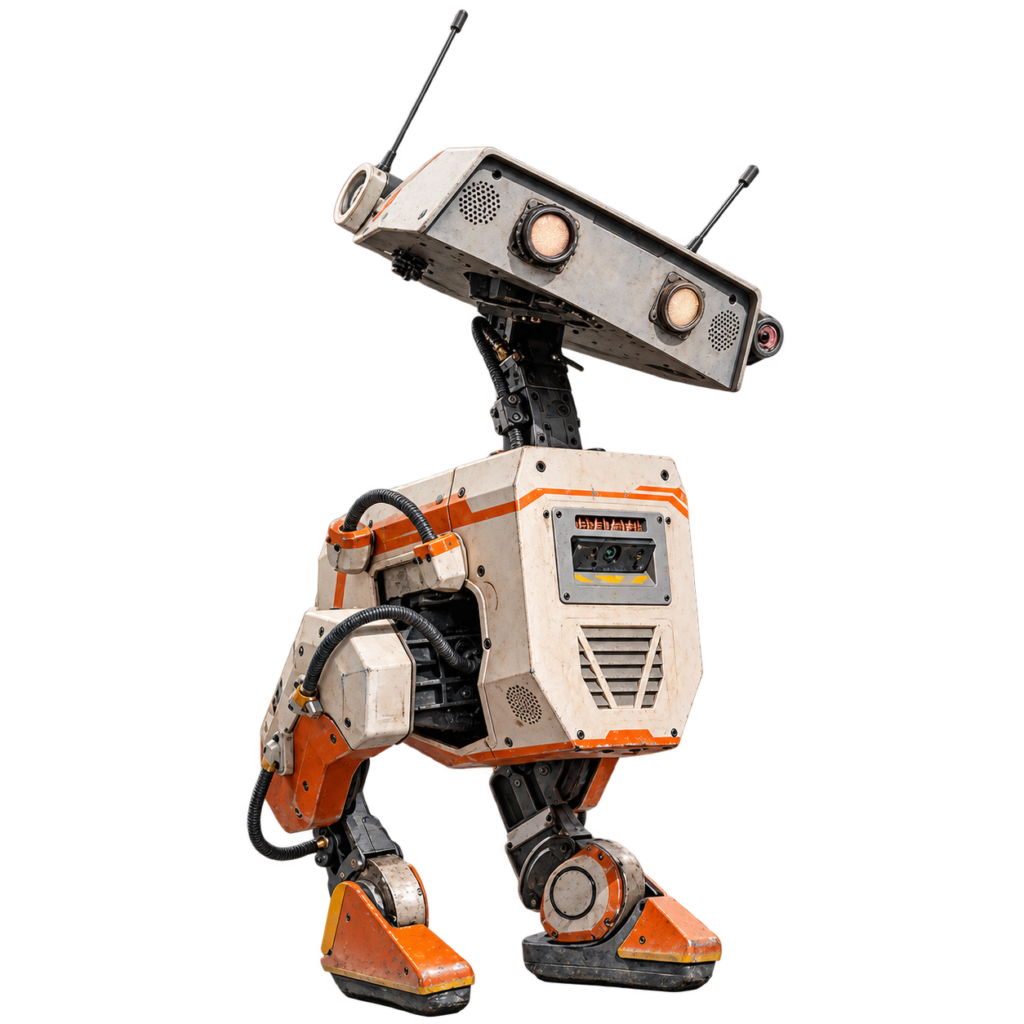
The BD-X is the small, two-legged droid that Disney revealed in October 2023 at Galaxy’s Edge, and that Jon Favreau said will appear in The Mandalorian and Grogu. You can’t buy one. But there’s an open-source project that rebuilds the idea at 42 cm, for a fraction of the cost. I’m going to build it, and you can follow along, one small step at a time.
No robotics background? No problem. You don’t need to know what a servo or a microcontroller is yet. I’ll explain every new word the first time it shows up, tell you what each step does and why, and show you how to check that it worked.
Who Is This Series For?
- Beginners. If you can follow a recipe, you can follow this series.
- Younger builders. Go for it, but do the soldering and the battery steps together with an adult.
- People who want to see the real thing. I’ll show the mistakes, the real costs and the parts that didn’t work the first time.
Safety comes first
Soldering irons and 3D printers get hot, and the robot runs on lithium-ion batteries. I’ll put a safety note before every step where it matters. Younger builders should do those steps with an adult.
How Every Part Works
Every part follows the same pattern, so you always know where you are:
- What you’ll do in this part, and what you need.
- Safety first, before any step that needs it.
- Numbered steps. For each one: what to do, what’s happening, and why.
- A check after each step: “Good result” and “Bad result”, so you know if you can move on.
- If it didn’t work: the common problems and how to fix them.
- Words explained at the end of each part.
What Is the Real BD-X?
Disney Research and Walt Disney Imagineering built the BD-X as a character, not as an industrial machine. According to their paper, it stands 66 cm tall, weighs 15.4 kg and has 14 powered joints in the legs, neck and head.
Its walking is learned with reinforcement learning in simulation: a computer practices walking millions of times in a virtual world before the real robot ever takes a step. A human puppeteer steers the character live. Disney’s own words: start with the character, and let the technology serve the story.
What Is Open Duck Mini?
Open Duck Mini is an open-source project by Antoine Pirrone and the community, released under the Apache-2.0 license. The robot is about 42 cm tall, uses 14 Feetech STS3215 servos and runs on a Raspberry Pi Zero 2W.
It’s not a Disney product and not an official copy. It’s a fan project that rebuilds the idea.
What Will It Cost?
The official v2 bill of materials comes to €398.10. I’m adding two spare servos, so one broken motor doesn’t stop the project.
| Item | Cost |
|---|---|
| Official v2 bill of materials | €398.10 |
| Two spare servos (€14 each) | €28.00 |
| Robot with spares | €426.10 |
| Optional expression package (eyes, antennas, speaker) | €34.24 |
| Everything together | €460.34 |
A 3D printer, a soldering iron and an Xbox controller aren’t included. These prices come from the project and may be out of date, so I check them when I order.
What I Want to Achieve
- A robot that stands and walks with the ready-made walking program.
- Then some character: antennas, LED eyes, sound, and a few animation layers like Disney uses.
- If that works: train my own walking program.
What I don’t expect is the dynamics of the original. The servos are far weaker than Disney’s actuators (about 1.9 N·m against 24 to 34 N·m, although Disney’s robot is also bigger), so recovering from a push or making fast moves is out of reach with these servos. Stronger motors exist, but they would make this a different, much heavier and far more expensive robot.
What I Don’t Know Yet
- Whether the Raspberry Pi Zero 2W has enough headroom for eyes, antennas and animation on top of walking. I’ll measure that in Part 7.
- How long the servos last before they overheat.
- How complete the build guide really is. The assembly guide calls itself incomplete.
The Plan in Nine Parts
| Part | What happens |
|---|---|
| 1 | The plan (this part) |
| 2 | The hardware: ordering the parts |
| 3 | Setting up the servos |
| 4 | Building the body |
| 5 | Wiring and power |
| 6 | Software and calibration |
| 7 | The first steps |
| 8 | Giving it character |
| 9 | Training your own walk |
Each part is published when the step is finished. That means you’ll see my mistakes too, and the plan may change along the way.
Words Explained
- Servo: a small motor that turns to an exact position and holds it. The robot has 14 of them, one for each joint.
- Raspberry Pi: a tiny, cheap computer. This one is the robot’s brain.
- Reinforcement learning: a way of teaching a computer by trial and error: it tries, gets a score and slowly gets better.
- Policy: the “walking program” that comes out of the training. It looks at what the robot senses and decides how every joint should move.
- Open source: the designs and code are public, so anyone can build, study and improve them.
Conclusion: A Small Droid with a Big Idea
A Disney-style droid doesn’t have to cost a fortune, as long as I’m honest about what it can and can’t do. Next up: ordering the parts and printing a test piece before I print all 36 files.
Small droid, big plans. Happy hacking!

Unofficial fan project
BD-X and Star Wars are trademarks of Disney/Lucasfilm. This site is not affiliated with, endorsed by or sponsored by Disney. The robot in this series is based on Open Duck Mini by Antoine Pirrone and contributors, released under the Apache-2.0 license.
Related
 Electronics
Temperature and Humidity over MQTT with an ESP-01
An ESP-01 with a DHT11 that publishes temperature and humidity every two seconds over MQTT.
Read more
Electronics
Temperature and Humidity over MQTT with an ESP-01
An ESP-01 with a DHT11 that publishes temperature and humidity every two seconds over MQTT.
Read more
 Opinion
Why You (Should or Shouldn’t) Buy a Smart Plug from Action
Budget smart plugs from Action and HEMA are cheap because they're all the same Tuya white-label hardware behind the scenes, and that convenience comes with your data routing through Tuya's servers. Here's what's actually inside one, and why reflashing it with your own firmware is the better deal.
Read more
Opinion
Why You (Should or Shouldn’t) Buy a Smart Plug from Action
Budget smart plugs from Action and HEMA are cheap because they're all the same Tuya white-label hardware behind the scenes, and that convenience comes with your data routing through Tuya's servers. Here's what's actually inside one, and why reflashing it with your own firmware is the better deal.
Read more
 Software
ESP32 HomeKit Development with ESP-IDF
A definitive setup guide for building Apple HomeKit accessories on the ESP32: a Dockerized ESP-IDF toolchain so the build environment stays identical across machines, no local dependency drift, no "works on my machine".
Read more
Software
ESP32 HomeKit Development with ESP-IDF
A definitive setup guide for building Apple HomeKit accessories on the ESP32: a Dockerized ESP-IDF toolchain so the build environment stays identical across machines, no local dependency drift, no "works on my machine".
Read more
More projects
Keep building.
Electronics, 3D printing and CNC builds, documented from the first idea to the last screw.
All projects