
Electronics
Show Your Own Logo on an OLED with an Arduino Nano
An Arduino Nano and an SSD1306 OLED on I2C that shows a black and white logo, with the Adafruit libraries.
- Arduino
- 2 min read
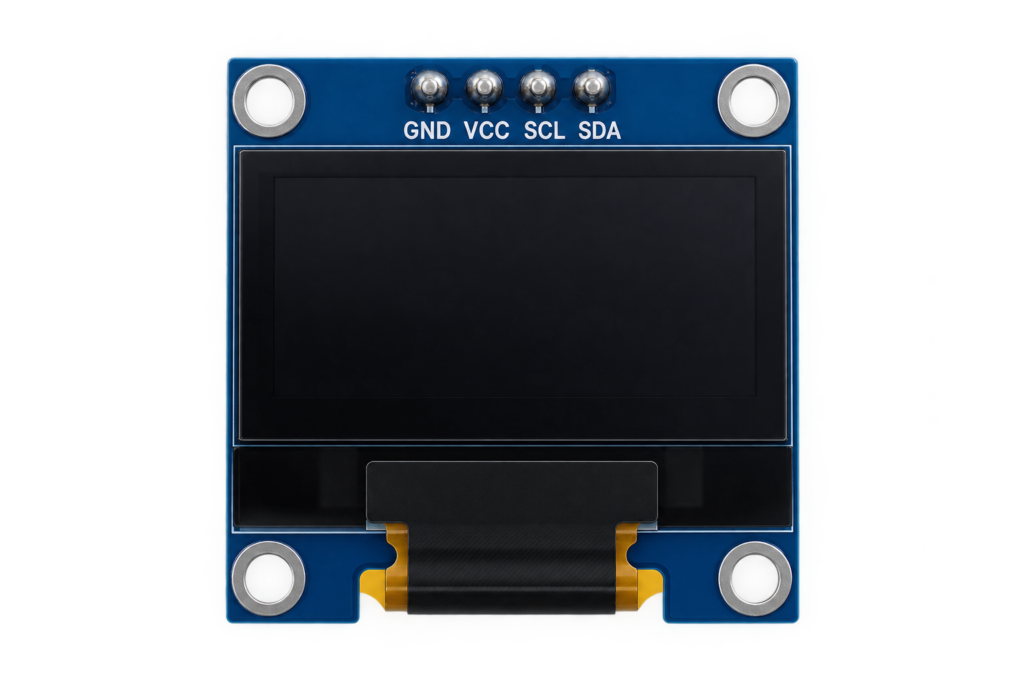
A small OLED display on an Arduino Nano that shows your own logo. The display talks over I2C and needs only four wires, and the logo is a black and white bitmap stored in the program.
There is also a version for a much smaller chip, in 0.91-inch OLED Display on an ATtiny85. For the display itself, see the SSD1306 OLED display guide.
Wiring
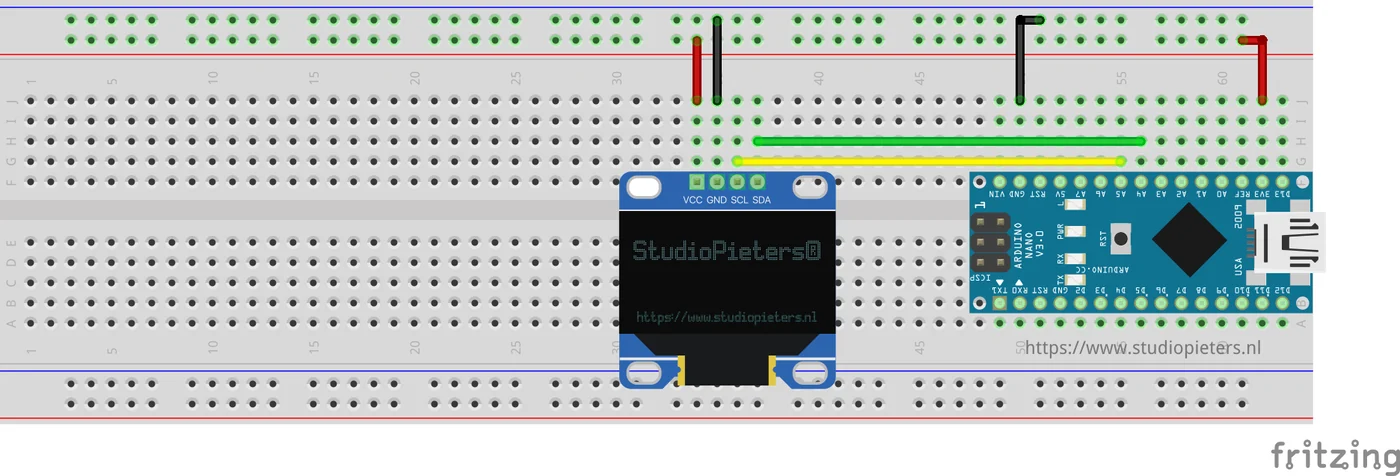
The display has four pins: VCC, GND, SCL and SDA. On an Arduino Nano, I2C uses A4 for SDA and A5 for SCL.
| Display pin | Arduino Nano pin |
|---|---|
| VCC | 5V or 3V3, as your display supports |
| GND | GND |
| SCL | A5 |
| SDA | A4 |
Libraries
The sketch uses the Adafruit libraries for the SSD1306 driver. Install these in the Library Manager of the Arduino IDE:
Adafruit SSD1306Adafruit GFX Library
The sketch
The display is set up as 128 by 64 pixels on I2C address 0x3C. The loop clears the display, draws the bitmap and waits eight seconds:
#include <SPI.h>
#include <Wire.h>
#include <Adafruit_GFX.h>
#include <Adafruit_SSD1306.h>

Adafruit_SSD1306 display = Adafruit_SSD1306(128, 64, &Wire);

static const unsigned char PROGMEM StudioPieters_glcd_bmp[] = {
  // the bytes of your bitmap
};

void setup() {
  Serial.begin(9600);
  display.begin(SSD1306_SWITCHCAPVCC, 0x3C);
  display.display();
  delay(1000);
  display.clearDisplay();
  display.display();
}

void loop() {
  display.clearDisplay();
  display.drawBitmap(0, 0, StudioPieters_glcd_bmp, 128, 64, 1);
  display.display();
  delay(8000);
}
The first display.display() shows the splash screen of the Adafruit library, which is why the sketch waits a second and clears the display before the loop starts.
Your own logo
- Make a black and white image of 128 by 64 pixels. The repository has the logo as a
.bmpfile. - Convert the image to an array of bytes with an image-to-array converter.
- Put the array in the sketch in place of
StudioPieters_glcd_bmp. - Upload the sketch to the Nano.
Good to know
- The repository holds the sketch, the logo and the images, and is under the MIT licence.
The project is in the Arduino-OLED-I2C repository on GitHub.
Related
 Electronics
Temperature and Humidity over MQTT with an ESP-01
An ESP-01 with a DHT11 that publishes temperature and humidity every two seconds over MQTT.
Read more
Electronics
Temperature and Humidity over MQTT with an ESP-01
An ESP-01 with a DHT11 that publishes temperature and humidity every two seconds over MQTT.
Read more
 Tools
Custom Fritzing Parts for ESP32, ESP8266 and More
About 40 custom Fritzing parts for the boards and modules used at StudioPieters, from the ESP32 to the DRV8825, free to use under a CC BY-NC-ND licence.
Read more
Tools
Custom Fritzing Parts for ESP32, ESP8266 and More
About 40 custom Fritzing parts for the boards and modules used at StudioPieters, from the ESP32 to the DRV8825, free to use under a CC BY-NC-ND licence.
Read more
 Tools
The OMNIFIXO M4
A Swedish-engineered magnetic modular third hand: anodized aluminum base, four articulating arms, and neodymium magnetic feet, built for soldering fine-pitch components and holding small parts still on the bench.
Read more
Tools
The OMNIFIXO M4
A Swedish-engineered magnetic modular third hand: anodized aluminum base, four articulating arms, and neodymium magnetic feet, built for soldering fine-pitch components and holding small parts still on the bench.
Read more
More projects
Keep building.
Electronics, 3D printing and CNC builds, documented from the first idea to the last screw.
All projects