
Electronics
Arduino and the AT-09 Bluetooth LE Module
Five Arduino sketches that set up an AT-09 BLE module with AT commands and send the temperature of a DHT22 to a phone.
- Arduino
- Archived
- 4 min read
Archived project
The GitHub repository for this project is archived: it is read-only and no longer updated. What follows describes the project as it was, so check for a newer alternative before you build it.
The AT-09 is a small Bluetooth LE module that an Arduino controls with AT commands over a serial line. This project is a series of five sketches that grow from a first “AT” test into an Arduino that sends the temperature of a DHT22 over Bluetooth, so you can read it in a BLE app on your phone.
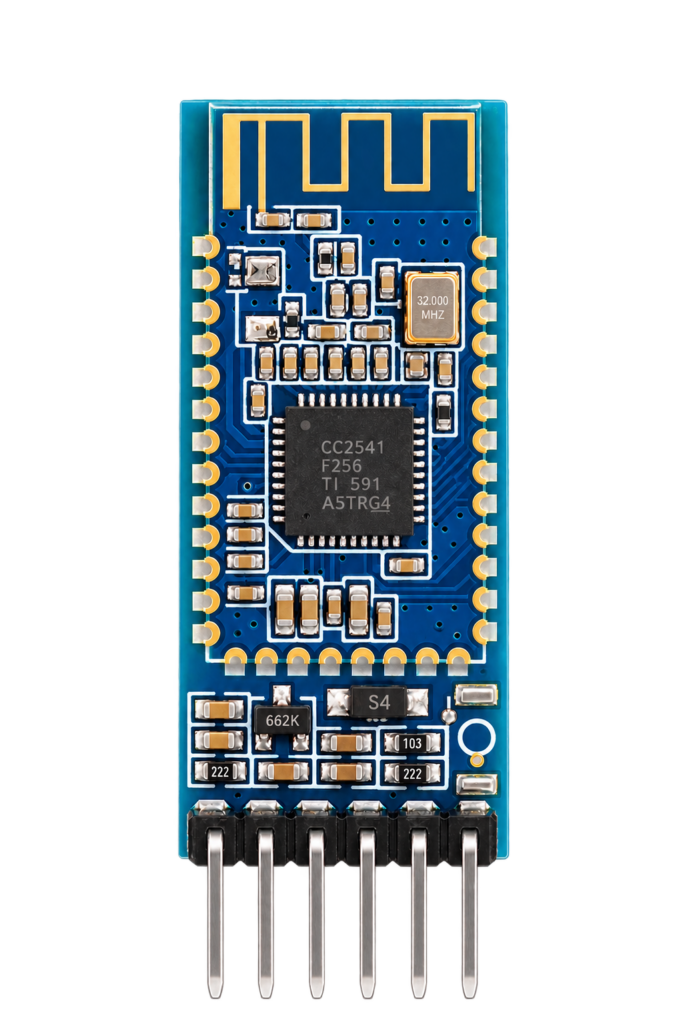
The AT-09 module
The AT-09 is one of the clones of the HM-10 module. Both are built on a Texas Instruments CC2541 chip, according to Arik Yavilevich, and they are sold under names such as CC41-A and MLT-BT05. They are not identical to the original:
- The genuine HM-10 expects commands without a line ending, and the CC41-A clones expect a carriage return and a new line. The sketches use
println(), which sends both. - The set of AT commands is smaller than that of the HM-10, and less documented, see EDN.
- AT commands only work while no phone is connected. After a connection is made, they are treated as data, see Martyn Currey.
- The serial pins of the module work on 3.3 V. On a 5 V Arduino, bring the Arduino TX down to 3.3 V with a voltage divider of 1 kΩ and 2 kΩ, as Martyn Currey advises for the HM-10.
Check the documentation of your own module, since clones differ between batches.
Wiring
The sketches use SoftwareSerial on pins 2 and 3 of the Arduino at 9600 baud, so the hardware serial port stays free for the serial monitor.
| Arduino pin | Module pin |
|---|---|
| D2 (RX) | TX |
| D3 (TX) | RX, through a voltage divider |
| 5V or 3.3V | Supply, as the module board supports |
| GND | GND |
The later sketches declare pins 4 and 5 for the EN and STATE pins of the module. They are not used in the code.
The five versions
| Version | What it does |
|---|---|
| 1.0.7 | Sends the command AT and prints the reply, to test the connection with the module |
| 1.0.7B | Also sets the role to a peripheral (AT+ROLE0), the service to 0xFF00, the characteristic to 0xFF01 and the name to LightBlue |
| 1.0.7C | Goes back to the usual service 0xFFE0 and characteristic 0xFFE1. It reads what arrives from the module in a loop and prints it, followed by a message. It declares the EN and STATE pins |
| 1.0.7D | Drops the reading from the module. Instead it reads a DHT22 on pin 8 every two seconds and sends the temperature in °C to the module and to the serial monitor |
| 1.0.7E | The same code as 1.0.7D |
The header of the 1.0.7D file already says 1.0.7.E, so the two files are the same sketch. The name LightBlue is also the name of a popular BLE app.
What the sketches do, and what they should do
Reading the final sketch line by line:
- Setup. At every start it sends
AT,AT+ROLE0,AT+UUID0xFFE0,AT+CHAR0xFFE1andAT+NAMELightBlueand prints each reply. FFE0 and FFE1 are the service and characteristic that the HM-10 uses by default for its serial data, which is what apps such as LightBlue expect. The module normally keeps these settings, so a single run is enough, but repeating them does no harm. - Loop. Every two seconds it reads the DHT22, skips the round if a reading fails and sends the temperature as text such as
21.50 °C. - What is read and not sent. The humidity, the temperature in Fahrenheit and the heat index are calculated and not sent. The function
writeSerialToBLE()and the two pin numbers are not used. - Buffers. The reply of a command is read into a buffer of 100 characters without a check on the length. A longer reply would write past the end of it. Keep the replies short or add a limit.
- Does it reach the phone? The module sends the text to a connected phone, and the app shows it if it listens for notifications on FFE1. The sketch does not check that a phone is connected.
What it should do is what the last version does: set up the module once, then send a value on a fixed interval. The next steps would be to send the humidity as well, to receive commands from the phone, and to use the STATE pin to see whether a phone is connected.
Good to know
- The repository holds the five sketches and is under the MIT licence.
The project is in the Arduino—AT-09-BLE-module repository on GitHub.
Related
 Electronics
RGB Light with an ESP8266 and Homebridge
An ESP8266 that drives an RGB light with PWM and answers the web requests of the homebridge-http-rgb-push plugin.
Read more
Electronics
RGB Light with an ESP8266 and Homebridge
An ESP8266 that drives an RGB light with PWM and answers the web requests of the homebridge-http-rgb-push plugin.
Read more
 Software
ESP32 Lifecycle Manager
ESP32-Lifecycle-Manager (LCM) is a smart “control tower” for your ESP32 device. At startup, LCM takes charge first: it handles network setup, update management, recovery procedures, and more, so your application can focus on its…
Read more
Software
ESP32 Lifecycle Manager
ESP32-Lifecycle-Manager (LCM) is a smart “control tower” for your ESP32 device. At startup, LCM takes charge first: it handles network setup, update management, recovery procedures, and more, so your application can focus on its…
Read more
 3D printing
ESP8685-WROOM-03 Programmer
For one of my new projects, I wanted to program an ESP8685-WROOM-03 module without soldering. Because let’s be honest... sometimes you just don’t want to mess around with flux, heat, and tiny pads.
Read more
3D printing
ESP8685-WROOM-03 Programmer
For one of my new projects, I wanted to program an ESP8685-WROOM-03 module without soldering. Because let’s be honest... sometimes you just don’t want to mess around with flux, heat, and tiny pads.
Read more
More projects
Keep building.
Electronics, 3D printing and CNC builds, documented from the first idea to the last screw.
All projects