
Electronics
ESP8266 Switch for a Philips Hue Light
An ESP8266 that switches a Philips Hue light through the Hue bridge with the Hue protocol, and sleeps between two presses.
- ESP8266
- Archived
- 3 min read
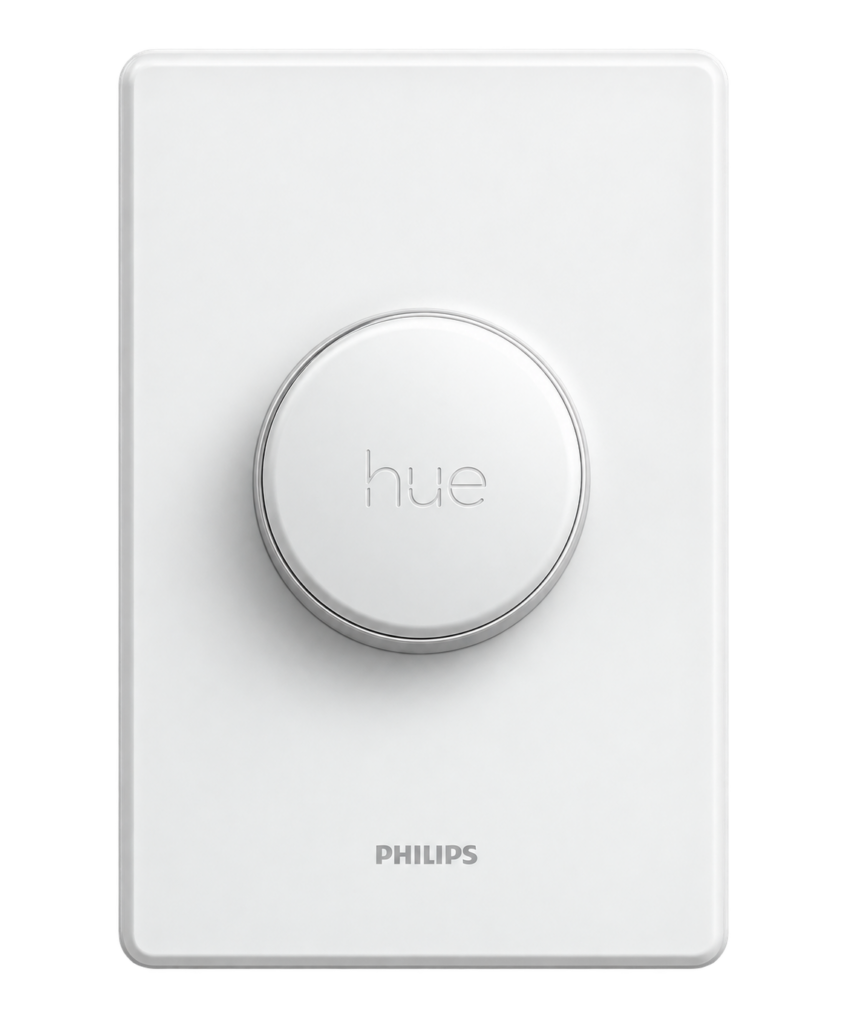
Archived project
The GitHub repository for this project is archived: it is read-only and no longer updated. What follows describes the project as it was, so check for a newer alternative before you build it.
A physical switch for a Philips Hue light, built on an ESP8266. It does not pretend to be a Hue accessory: it talks to the Hue bridge the way the Hue protocol describes, so the bridge and the light do exactly what they do for any other switch. It worked, and there is a video of it on YouTube.
How it works
The switch asks the Hue bridge whether a light is on, and then sends the opposite. It does this over the network, with two calls to the bridge:
| Step | Call to the bridge | What it does |
|---|---|---|
| 1 | GET /api/<username>/lights/<number> | Reads the state of the light and picks out the value of on |
| 2 | PUT /api/<username>/lights/<number>/state | Sends {"on": true} when the light is off and {"on": false} when it is on |
Afterwards the ESP8266 goes into deep sleep. ESP.deepSleep(0) puts it to sleep until the next reset, so it uses almost no power between two presses, and a press that resets the module starts the next run.
The username is a key that the bridge makes for a program that wants to control it. It is made on the bridge, as described in the Philips Hue developer documentation, and it gives access to the lights, so keep it private.
The sketch
The sketch is version 2.3.3. The values that you have to change are the address of the bridge, the username, the number of the light and your WiFi name and password. The values below are placeholders:
#include <ESP8266WiFi.h>

IPAddress ip(192, 168, 1, 50);        // a fixed address for this switch
IPAddress gateway(192, 168, 1, 1);
IPAddress subnet(255, 255, 255, 0);

int light = 1;                        // number of the Hue light to switch
const char hueHubIP[] = "192.168.1.100";        // IP address of the Hue bridge
const char hueUsername[] = "YOUR_HUE_USERNAME"; // username made on the bridge
const int hueHubPort = 80;
const char ssid[] = "SSID";
const char pass[] = "password";

boolean onOffState = false;           // state of the light, as reported by the bridge
WiFiClient client;

void getHue() {                       // ask the bridge if the light is on
  if (client.connect(hueHubIP, hueHubPort)) {
    client.print("GET /api/"); client.print(hueUsername);
    client.print("/lights/"); client.print(light);
    client.println(" HTTP/1.1");
    client.print("Host: "); client.println(hueHubIP);
    client.println("Content-type: application/json");
    client.println("keep-alive");
    client.println();
    while (client.connected()) {
      if (client.available()) {
        client.findUntil(""on":", "");
        onOffState = (client.readStringUntil(',') == "true");
        break;
      }
    }
    client.stop();
  }
}

void setHue(String command) {         // send a new state to the light
  if (client.connect(hueHubIP, hueHubPort)) {
    client.print("PUT /api/"); client.print(hueUsername);
    client.print("/lights/"); client.print(light);
    client.println("/state HTTP/1.1");
    client.println("keep-alive");
    client.print("Host: "); client.println(hueHubIP);
    client.print("Content-Length: "); client.println(command.length());
    client.println("Content-Type: text/plain;charset=UTF-8");
    client.println();
    client.println(command);
    client.stop();
  }
}

void setup() {
  WiFi.config(ip, gateway, subnet);
  WiFi.begin(ssid, pass);
  while (WiFi.status() != WL_CONNECTED) { delay(1); }
}

void loop() {
  getHue();
  if (onOffState == true) { setHue("{"on": false}"); }
  else                    { setHue("{"on": true}"); }
  ESP.deepSleep(0);                   // sleep until the next reset
}
Good to know
- The sketch uses the older Hue API, which was current at the time. Check the Hue documentation for what your bridge supports today.
- Never publish your Hue username. If it leaks, remove it from the bridge and make a new one.
- Philips and Hue are trademarks of their owners. This project is not made or approved by them.
- The repository holds the sketch and is under the MIT licence.
The project is in the ESP8266-Philips-hue-Switch repository on GitHub.
Related
 Electronics
Building a micro-Duck, Part 2: The Hardware
Every part you need for the XGO-Duck, what it does, and what to check before you order. A shopping list based on the official parts list, with a checklist for when the boxes arrive.
Read more
Electronics
Building a micro-Duck, Part 2: The Hardware
Every part you need for the XGO-Duck, what it does, and what to check before you order. A shopping list based on the official parts list, with a checklist for when the boxes arrive.
Read more
 Electronics
RGB Light with an ESP8266 and Homebridge
An ESP8266 that drives an RGB light with PWM and answers the web requests of the homebridge-http-rgb-push plugin.
Read more
Electronics
RGB Light with an ESP8266 and Homebridge
An ESP8266 that drives an RGB light with PWM and answers the web requests of the homebridge-http-rgb-push plugin.
Read more
 3D printing
Building a 3D Printed Pit Droid, Part 3: Printing the Parts
What to print first, which settings give strong parts without wasting filament, which parts need supports, and the exact list of files for the full animatronic build on a 220 mm bed, with the stand and the Death Star grill. With a log for what I really used.
Read more
3D printing
Building a 3D Printed Pit Droid, Part 3: Printing the Parts
What to print first, which settings give strong parts without wasting filament, which parts need supports, and the exact list of files for the full animatronic build on a 220 mm bed, with the stand and the Death Star grill. With a log for what I really used.
Read more
More projects
Keep building.
Electronics, 3D printing and CNC builds, documented from the first idea to the last screw.
All projects