
HomeKit
ESP8266 HomeKit Temperature and Humidity Sensor
A DHT11 or DHT22 with an ESP8266 as a temperature and humidity sensor in Apple Home, with a firmware version for each sensor and pin.
- ESP8266
- HomeKit
- 3 min read
A temperature and humidity sensor for Apple Home, built on an ESP8266 and a DHT11 or DHT22. The firmware reads the sensor every three seconds and reports both values to HomeKit, so you see them in the Home app and can use them in automations.
This is a test setup on a breadboard, with a version of the firmware for each sensor.
DHT11 or DHT22
Both sensors measure temperature and humidity and use the same three connections. They differ in range and accuracy, as the Adafruit product pages for the DHT11 and the DHT22 list them (checked on 26 September 2026):
| DHT11 | DHT22 | |
|---|---|---|
| Humidity | 20 to 80 %, 5 % accuracy | 0 to 100 %, 2 to 5 % accuracy |
| Temperature | 0 to 50 °C, ±2 °C | -40 to 80 °C, ±0.5 °C |
| Sampling | At most once a second | At most once every 2 seconds |
| Supply | 3 to 5 V | 3 to 5 V |
The firmware asks for a reading every 3 seconds, which is slower than either sensor needs. Use the DHT22 if you need a wider range or better accuracy, and the DHT11 when the small and cheap sensor is enough.
What it does
| Feature | Details |
|---|---|
| Temperature and humidity | Read every 3 seconds and sent to HomeKit |
| Fault | If the sensor cannot be read, the accessory reports a fault |
| Identify | The LED flashes in three groups of two |
| Updates | Over the air, through an OTA trigger characteristic |
| Prepared, not in use | A tamper input on GPIO14 and a battery check on the ADC input, which reports a low battery below 3.9 V. Both are preparations for later, and are not used in this test setup |
Pins and firmware versions
The sensor and the LED use GPIO2 and GPIO4. Which one is free depends on your board, so every release has both variants for both sensors:
| File | Sensor | Sensor pin | LED pin |
|---|---|---|---|
| dht11_gpio2.bin | DHT11 | GPIO2 | GPIO4 |
| dht11_gpio4.bin | DHT11 | GPIO4 | GPIO2 |
| dht22_gpio2.bin | DHT22 | GPIO2 | GPIO4 |
| dht22_gpio4.bin | DHT22 | GPIO4 | GPIO2 |
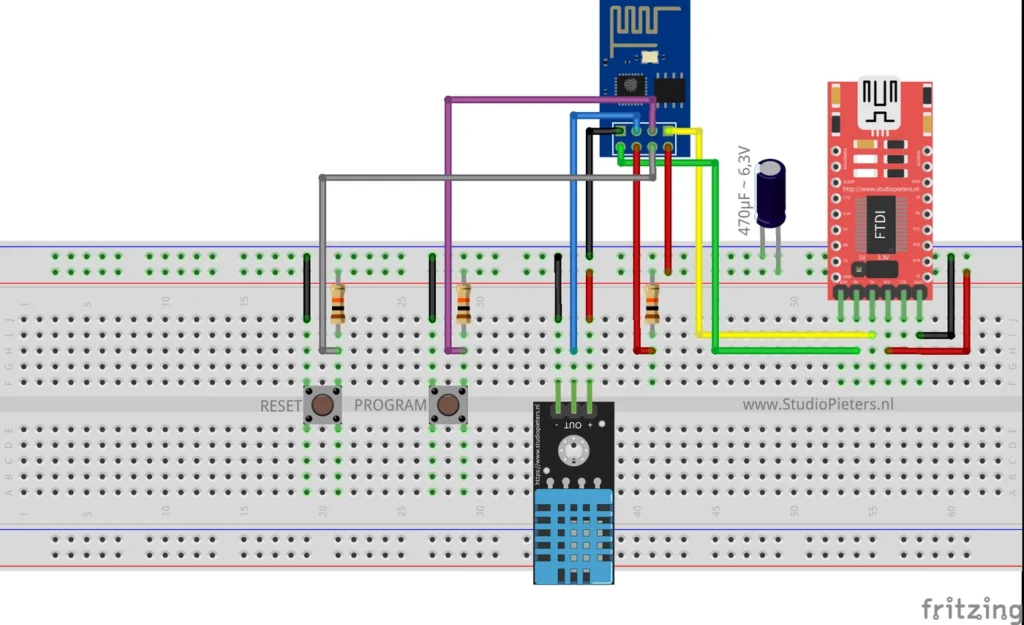
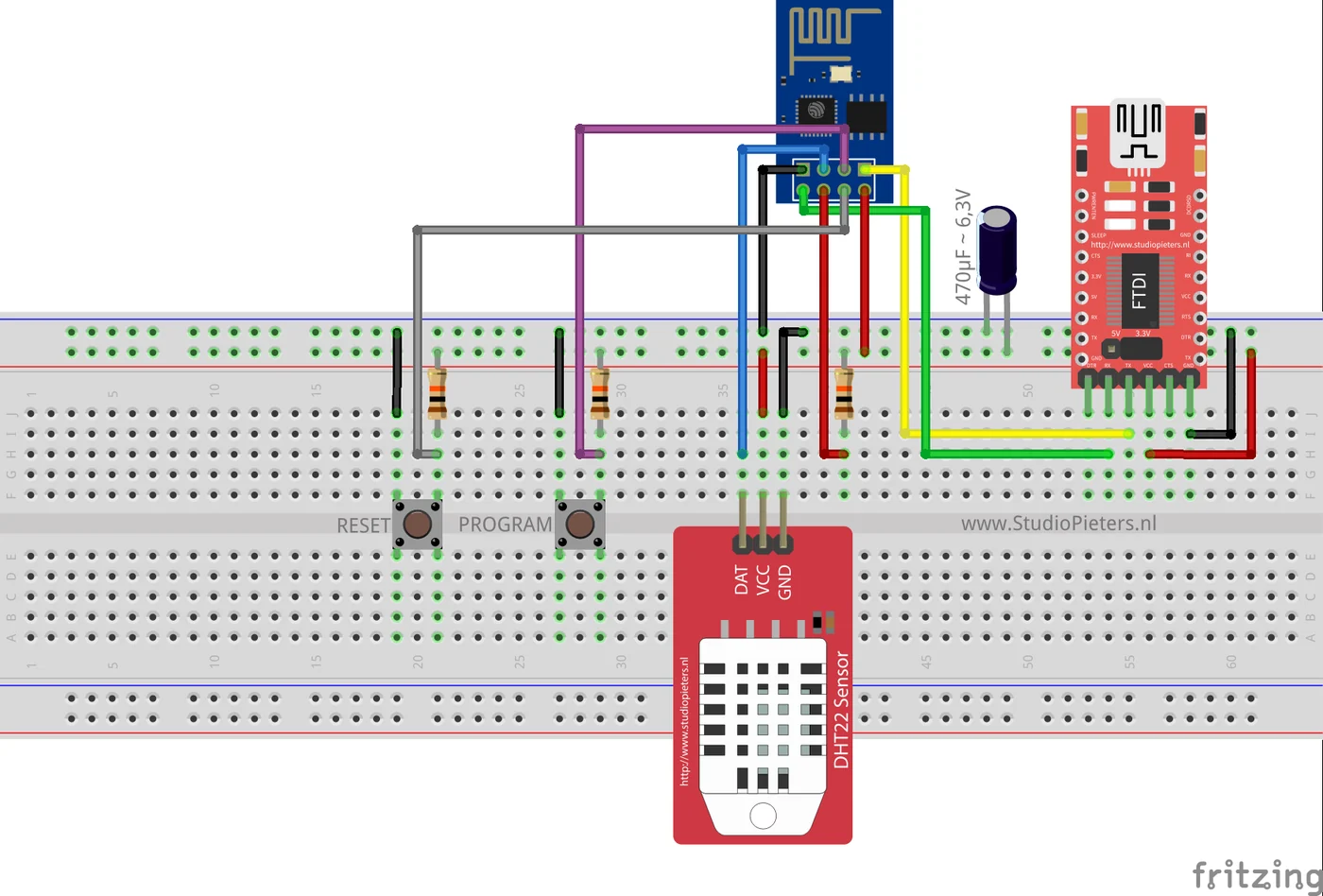
The diagrams show a module of the ESP-01 type, which has only a few pins free. See the ESP8266-01 pinout for what is available.
The circuit
The breadboard diagrams show the module, an FTDI adapter that powers the setup and programs the module, a 470 µF capacitor rated 6.3 V on the supply, and two buttons with resistors, marked RESET and PROGRAM. The sensor is connected with three wires. On the DHT11 board the pins are marked OUT, + and -, on the DHT22 board DAT, VCC and GND.
Flash and install
The installation is the same as for the other ESP8266 HomeKit accessories on this site. The firmware runs on ESP-Open-RTOS with Life Cycle Manager 2, which sets up the WiFi and installs updates over the air. The full steps, from installing esptool to flashing, joining the LCM- WiFi network and pairing, are in ESP8266 HomeKit Blinds.
In the portal, use these values. Pick the binary that matches your sensor and pin, for example dht22_gpio4.bin for a DHT22 on GPIO4:
| Field | Value |
|---|---|
| OTA repository | AchimPieters/ESP8266-HomeKit-Temperature-Humidity-Sensor |
| OTA binary file | dht22_gpio4.bin |
When the installation is done, scan the QR code the device generates in the Home app to add the sensor.
Releases
| Version | Date | Changes |
|---|---|---|
| 0.0.4 | 20 March 2021 | Four binaries: DHT11 and DHT22, each with the sensor on GPIO2 or GPIO4 |
| 0.0.3 | 17 February 2021 | Sensor pin changed from GPIO2 to GPIO4, over-the-air updates, battery support and tamper control, both disabled, new QR code |
| 0.0.2 | 20 December 2020 | The same changes, with battery support and tamper control optional |
| 0.0.1 | 13 May 2019 | First release |
Good to know
- The HomeKit Accessory Protocol specification the firmware follows is the non-commercial version, for accessories you build yourself and do not distribute or sell.
- The repository is under the MIT licence. The HomeKit setup code is set in the firmware source, so change it to your own.
The project is in the ESP8266-HomeKit-Temperature-Humidity-Sensor repository on GitHub.
Related
 HomeKit
ESP8266 HomeKit Blinds
* This project is featured on Instructables
Read more
HomeKit
ESP8266 HomeKit Contact Sensor with a Hall Sensor
A general contact sensor for Apple HomeKit: use it on anything that opens and closes, and the Home app shows whether it is open or closed.
Read more
HomeKit
ESP8266 HomeKit Blinds
* This project is featured on Instructables
Read more
HomeKit
ESP8266 HomeKit Contact Sensor with a Hall Sensor
A general contact sensor for Apple HomeKit: use it on anything that opens and closes, and the Home app shows whether it is open or closed.
Read more
 HomeKit
ESP32 Power Plug
For years, the Dutch retailer Action has offered affordable smart-home devices under the brand LSC Smart Connect.
Read more
HomeKit
ESP32 Power Plug
For years, the Dutch retailer Action has offered affordable smart-home devices under the brand LSC Smart Connect.
Read more
More HomeKit
Keep building.
Switches, sensors, plugs and blinds: more accessories that you build yourself and add to the Home app.
All HomeKit