
Reference
2.25 inch TFT LCD ST7789 SPI Display
A compact 128 x 400 IPS display driven by the ST7789 controller over a 4-wire SPI bus. This guide covers the pinout, ESP32 wiring, and Arduino code using the Adafruit ST7789 library.
- 2.25 inch IPS
- 128 × 400 pixels
- ST7789
- 4-wire SPI
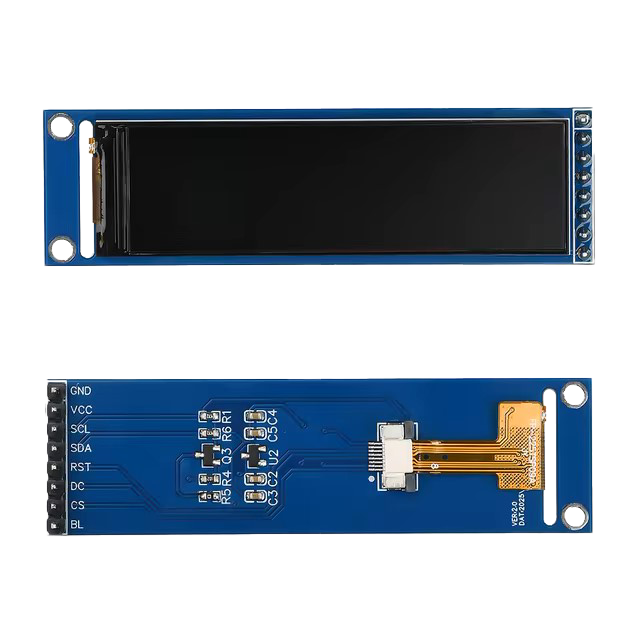
The 2.25 inch TFT LCD ST7789 SPI display is a compact but powerful module, perfect for all kinds of embedded projects. Whether you are using an ESP32, Arduino, or Raspberry Pi, this screen allows you to display sharp, colorful graphics. In this article, we will take a closer look at the specifications, pinout, and how to use the display.
The details in this guide come from common documentation of this display module and the ST7789 driver. I could not read the ST7789 datasheet for this update, and modules from different sellers vary.
Specifications
- Size: 2.25 inch
- Resolution: 128 x 400 pixels
- Driver IC: ST7789
- Interface: SPI (4-wire)
- Supply Voltage: 3.3V
- Colors: 65K / 262K
- Viewing Angle: IPS, wide viewing angle
- Backlight: LED
Dimensions
The 2.25 inch display is a long and narrow IPS panel of 128 × 400 pixels on a small board with an 8-pin header. The panel size, the board size and the mounting holes vary between sellers, so measure yours before you design a case. A flexible cable connects the panel to the board, so do not bend it sharply.
Source: the details come from the existing text of this guide and common practice, not from a datasheet read for this update.
Pinout
This module usually comes with a standard SPI pinout. Depending on the manufacturer, pin definitions may slightly vary, but in most cases they are as follows:
| Pin | Description |
|---|---|
| GND | Ground |
| VCC | Power 3.3V |
| SCL | SPI Clock |
| SDA | SPI MOSI (data) |
| RES | Reset |
| DC | Data/Command select |
| CS | Chip Select |
| BLK | Backlight control |
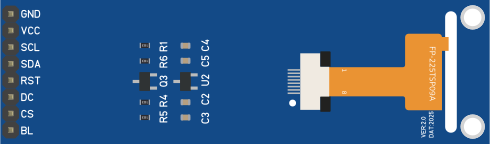
Some versions do not include a CS pin, as they are designed to be used as the only device on the SPI bus.
Wiring with ESP32
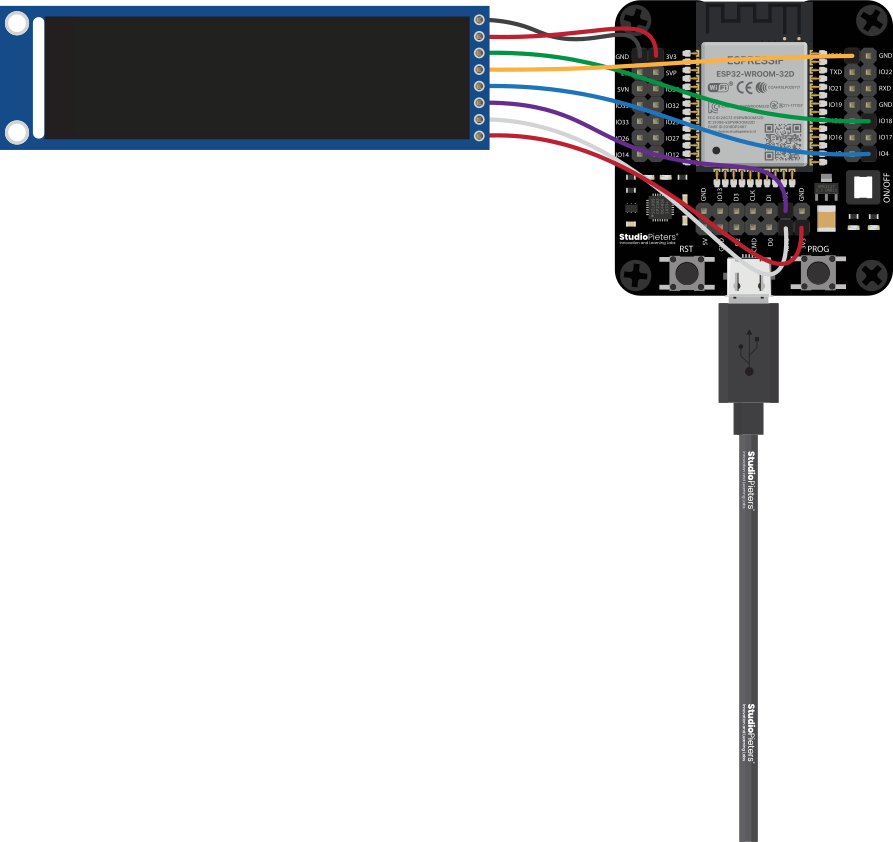
An example connection between the ESP32 and the ST7789 display:
| Display | ESP32 |
|---|---|
| VCC | 3V3 |
| GND | GND |
| SCL | GPIO18 (SCLK) |
| SDA | GPIO23 (MOSI) |
| RES | GPIO4 |
| DC | GPIO2 |
| CS | GPIO15 |
| BLK | 3V3 or via transistor/PWM |
Software
In the Arduino IDE you can use the Adafruit ST7789 or TFT_eSPI library. These libraries make it easy to draw text, shapes, images, and even graphs.
Example code using the Adafruit ST7789 library:
#include <Adafruit_GFX.h>
#include <Adafruit_ST7789.h>
#include <SPI.h>

#define TFT_CS     15
#define TFT_RST    4
#define TFT_DC     2

Adafruit_ST7789 tft = Adafruit_ST7789(TFT_CS, TFT_DC, TFT_RST);

void setup() {
  tft.init(400, 128); // resolution 400x128 (2.25 inch)
  tft.fillScreen(ST77XX_BLACK);
  tft.setCursor(10, 10);
  tft.setTextColor(ST77XX_WHITE);
  tft.setTextSize(2);
  tft.println("Hello ST7789!");
}

void loop() {
}
Applications
- Small user interfaces
- Sensor dashboards
- IoT projects
- Graphical representation (icons, gauges, charts)
- DIY handhelds or retro consoles
Real gotchas
- 3.3 V only. The module is a 3.3 V part. A 5 V Arduino needs level shifters on the signal lines.
- The pin names are not standard. SCL is the SPI clock and SDA is the SPI data (MOSI). Do not wire them as I2C.
- Some modules have no CS pin. They are meant to be the only device on the bus.
- The offsets depend on the panel. A 128 × 400 panel is not a common size. The library needs the right width, height and offset or the picture is shifted.
- The backlight needs a pin or a transistor. Powering BLK from 3.3 V is fine for a fixed brightness. For PWM dimming use a transistor.
- Use hardware SPI. It is much faster than software SPI for a picture of this size.
- The frame buffer is big. 128 × 400 pixels in 16 bit colour is about 100 KB. A microcontroller without PSRAM may not fit it.
- Colours can be inverted. If the colours are wrong, invert the display in the library.
Safety notes
Before you wire anything up
- Power the module from 3.3 V.
- Do not bend the panel cable sharply, and keep the glass away from impact.
- Never connect the board to mains voltage. Keep it on a low-voltage supply.
- Disconnect the power before you change the wiring.
Conclusion
The 2.25 inch TFT LCD ST7789 is an excellent choice if you are looking for a compact yet colorful display. With its simple SPI interface, wide library support, and sharp IPS panel, this module is perfect for both hobby projects and professional applications.
Related
 Guide
ESP32-C3-MINI-1 Pinout
The complete pin reference for the ESP32-C3-MINI-1 module: a single RISC-V core, Wi-Fi and Bluetooth LE, and the exact pins you can safely reuse.
Read more
 Reference
MG996R Servo
The standard-size, high-torque metal gear servo: specifications, the position versus 360 degree confusion, wiring and the control signal, how to power it without brownouts, and how to drive it from an ESP32-S3.
Read more
 Reference
Seeed Studio XIAO nRF52840 Pinout
The Seeed XIAO nRF52840 pin reference: every pin with its nRF pin, the RGB and charge LEDs, the Sense sensors, battery reading and the double-tap bootloader.
Read more
More guides
Keep building.
From ESP32 HomeKit accessories to Arduino and ATtiny reference guides, there’s more where this came from.
All guides